
AD 对象与组成员的 LDAP 查询
LDAP 返回 Success,并不表示同步程序拿到了完整数据。一次搜索可以少对象,一个对象可以少属性值,组成员查询也可能只回答直接关系而没有回答应用真正关心的资格问题。
完整查询需要分别处理对象分页、多值属性范围、嵌套成员关系和主组。下面以 Windows Server 2022 的 LAB-DC1.corp.test.checo.cc、Windows PowerShell 5.1 为例,逐层检查结果是否满足同步程序的需求。
1. 查询完整性
| 层次 | 容易漏掉的内容 | 应检查的东西 |
|---|---|---|
| 搜索结果集合 | 第 1000 条之后的对象 | PageSize、分页控制与响应 cookie |
| 单对象多值属性 | 大组 member 的后续范围 | 返回属性名中的 range 与末段星号 |
| 组关系 | 经内组间接加入外组的用户 | 直接关系或传递关系的查询语义 |
| 主组 | 不体现在 memberOf 中的主组 | primaryGroupID 与完整组 SID |
分页 cookie 结束,不等于 member 范围结束。member 值全读完,也不等于枚举了所有嵌套用户。把这几层混用,是“加了分页还漏人”最常见的解释之一。
2. 对象分页
schema 实验中,未分页查询只得到 1000 条。DirectorySearcher.PageSize=0 时,FindAll 枚举结束却没有异常;同一类问题在裸 LdapConnection.SendRequest 下出现 DirectoryOperationException,服务端 resultCode 为 4(sizeLimitExceeded),已经返回的条目仍在异常的 Response.Entries 中。
检查异常时应从 Exception.Response.ResultCode 和 Response.Entries 取信息,不能把 PartialResults 为空解释成没有任何返回。
历史记录中的计数为:
| 路径 | 数量 | 记录到的表现 |
|---|---|---|
| DirectorySearcher,不分页 | 1000 | 无异常 |
| LdapConnection,不分页 | 1000 个部分条目 | sizeLimitExceeded |
| DirectorySearcher,PageSize=500 | 1770 | 枚举完成 |
| 裸 LDAP 分页,PageSize=500 | 1769,4 页 | 无重复 |
| AD 模块独立查询 | 1768 | 与其他路径存在差项 |
三个完整结果计数分别是 1770、1769、1768,不能只用一个 CN=Aggregate 虚拟条目解释全部差异。先对齐 SearchBase、Scope、是否包含搜索根和虚拟条目,再按 DN 比较差集;当前计数本身还不足以确认三个结果集合等价。
可以确认的核心现象是:不分页停在 1000,分页继续取得更多对象;无异常不足以验收完整性。复核时要固定同一 DC、Base、Scope、Filter、请求属性及身份,按 DN 集合记录具体多出/缺失项,不能只对总数。
按 cookie 分页并收集 DN
下面的只读示例固定 OneLevel、使用 Negotiate 签名/密封,缺失分页响应控制就失败,结束时释放连接。它按 DN 去重,不把不一定唯一的 lDAPDisplayName 当对象身份:
Add-Type -AssemblyName System.DirectoryServices.Protocols
$dc = 'LAB-DC1.corp.test.checo.cc'
$ldap = New-Object System.DirectoryServices.Protocols.LdapConnection($dc)
$ldap.AuthType = [System.DirectoryServices.Protocols.AuthType]::Negotiate
$ldap.SessionOptions.Signing = $true
$ldap.SessionOptions.Sealing = $true
$ldap.Timeout = [TimeSpan]::FromSeconds(30)
try {
    $ldap.Bind()
    $rootRequest = New-Object System.DirectoryServices.Protocols.SearchRequest(
        '', '(objectClass=*)',
        [System.DirectoryServices.Protocols.SearchScope]::Base,
        [string[]]@('schemaNamingContext'))
    $rootResponse = $ldap.SendRequest($rootRequest)
    $base = [string]$rootResponse.Entries[0].Attributes['schemaNamingContext'][0]
    $request = New-Object System.DirectoryServices.Protocols.SearchRequest(
        $base, '(objectClass=*)',
        [System.DirectoryServices.Protocols.SearchScope]::OneLevel,
        [string[]]@('distinguishedName'))
    $page = New-Object System.DirectoryServices.Protocols.PageResultRequestControl(500)
    $page.IsCritical = $true
    [void]$request.Controls.Add($page)
    $dns = New-Object 'System.Collections.Generic.HashSet[string]' ([StringComparer]::OrdinalIgnoreCase)
    $pages = 0
    $duplicates = 0
    do {
        $response = $ldap.SendRequest($request)
        $pages++
        foreach ($entry in $response.Entries) {
            if (-not $dns.Add($entry.DistinguishedName)) { $duplicates++ }
        }
        $reply = @($response.Controls | Where-Object {
            $_ -is [System.DirectoryServices.Protocols.PageResultResponseControl]
        })
        if ($reply.Count -ne 1) { throw 'Expected one paging response control' }
        $page.Cookie = $reply[0].Cookie
    } while ($page.Cookie.Length -ne 0)
    [pscustomobject]@{ Objects=$dns.Count; Pages=$pages; Duplicates=$duplicates }
} finally {
    $ldap.Dispose()
}
页大小 500 是客户端请求值,不需要调大服务器 MaxPageSize。若分页控制报错、cookie 被服务器逐出或请求超时,整轮结果应标记为不完整,重新从头读取并对账,不能把已收集部分当作成功的同步输入。查询中途不改变连接、Base、Filter 或 Scope。
3. 大组范围检索
大组实验先创建 1500 个禁用测试用户,再加第 1501 个。目标 DC 的 MaxValRange=1500、MaxPageSize=1000,经查询策略与 ntdsutil 回读核对。所有组查询的 ResultCode 都为 0,Entries 都是 1。
| 实际成员数 | 请求 | 响应属性及数量 |
|---|---|---|
| 1500 | member | member:1500 |
| 1501 | member | member:0;member;range=0-1499:1500 |
| 1501 | member 加对象分页 | 同上;分页 cookie 已为空 |
| 1501 | member;range=0-* | member;range=0-1499:1500 |
| 1501 | member;range=1500-* | member;range=1500-*:1 |
只看 Attributes['member'] 会误报空组;找到了 range 属性却不续读,就会少一人。对象分页已经完成,因为结果确实只有一个组;需要继续的是这个对象内部的属性范围。微软范围检索说明
下标从零开始、两端包含。返回 0-1499 后下一次从 1500 开始。请求 0-* 只是请求剩余值,仍受服务器限制;只有返回属性名的末段星号才能作为结束条件。
下面的整理示例针对已确认存在、可读且非空的组。支持普通 member 响应及 range 响应,校验起点、数量、重复和终止段,并设置请求次数上限。它不是识别“空组”和“属性不可读”的万能接口:
Add-Type -AssemblyName System.DirectoryServices.Protocols
$dc = 'LAB-DC1.corp.test.checo.cc'
$groupDN = Read-Host 'DN of an existing, readable, nonempty group'
$ldap = New-Object System.DirectoryServices.Protocols.LdapConnection($dc)
$ldap.AuthType = [System.DirectoryServices.Protocols.AuthType]::Negotiate
$ldap.SessionOptions.Signing = $true
$ldap.SessionOptions.Sealing = $true
$ldap.Timeout = [TimeSpan]::FromSeconds(15)
$members = New-Object 'System.Collections.Generic.HashSet[string]' ([StringComparer]::OrdinalIgnoreCase)
$chunks = New-Object System.Collections.Generic.List[object]
$low = 0
$done = $false
try {
    $ldap.Bind()
    for ($iteration=0; $iteration -lt 10000; $iteration++) {
        $attribute = 'member;range={0}-*' -f $low
        $request = New-Object System.DirectoryServices.Protocols.SearchRequest(
            $groupDN, '(objectClass=group)',
            [System.DirectoryServices.Protocols.SearchScope]::Base,
            [string[]]@($attribute))
        $response = $ldap.SendRequest($request)
        if ($response.Entries.Count -ne 1) { throw 'Expected one group' }
        $entry = $response.Entries[0]
        $names = @($entry.Attributes.AttributeNames | Where-Object {
            $_ -match '^member(;range=\d+-(\d+|\*))?$' -and
            $entry.Attributes[$_].Count -gt 0
        })
        if ($names.Count -ne 1) { throw 'No unique member range; check empty group, rights, or response' }
        $name = [string]$names[0]
        $values = @($entry.Attributes[$name].GetValues([string]))
        foreach ($dn in $values) {
            if (-not $members.Add($dn)) { throw 'Repeated member; check concurrent changes' }
        }
        $chunks.Add([pscustomobject]@{ Requested=$attribute; Returned=$name; Count=$values.Count })
        if ($name -ieq 'member') {
            if ($low -ne 0) { throw 'Unexpected plain attribute during continuation' }
            $done=$true; break
        }
        $m = [regex]::Match($name, '^member;range=(\d+)-(\d+|\*)$', 'IgnoreCase')
        if (-not $m.Success -or [int]$m.Groups[1].Value -ne $low) { throw 'Invalid range start' }
        if ($m.Groups[2].Value -eq '*') { $done=$true; break }
        $high = [int]$m.Groups[2].Value
        if ($high -lt $low -or $values.Count -ne $high-$low+1) { throw 'Nonprogress range' }
        $low = $high+1
    }
    if (-not $done) { throw 'Terminal range not received' }
    $chunks | Format-Table
    'Unique members: {0}' -f $members.Count
} finally {
    $ldap.Dispose()
}
测试组实际读到 1501 个唯一 DN,与创建记录一致。复用上面的范围检索示例时,也应将结果与已知成员清单比较,并检查失败分支。
固定一台 DC 可减少复制差异,但范围检索本身不是整组的事务快照。大组持续变更时,重复检测只能发现部分问题,不能证明没有遗漏;同步程序还需记录对象变更状态、重试整轮或采用适合自身一致性要求的同步机制。不要用“一轮无重复”承诺目录从未变动。
4. 嵌套组查询
嵌套实验先把测试用户直接放入外组,两种查询都命中 1 人;随后只改变成员链为“用户 → 内组 → 外组”,直接 memberOf 等值查询变成 0,in-chain 仍为 1。无关用户始终没有被命中,恢复直接关系后原查询重新命中。
OID 1.2.840.113556.1.4.1941 沿 DN 链做传递匹配。它解决的是这类目录链接关系,不会自动把主组或所有资源授权机制补进结果。应用只检查一个人的资格时,仍应保留人员类型、唯一身份和业务范围条件。
下面是带过滤值转义的整理示例;转义 LDAP 过滤器值与构造 DN 是不同问题:
function Escape-LdapFilterValue([string]$value) {
    $value.Replace('\','\5c').Replace('*','\2a').Replace('(','\28').Replace(')','\29').Replace([string][char]0,'\00')
}
$userSam = Escape-LdapFilterValue 'a03in-ca31058c'
$outerDN = Escape-LdapFilterValue (Read-Host 'Target outer group DN')
$filter = '(&(objectCategory=person)(objectClass=user)(sAMAccountName={0})(memberOf:1.2.840.113556.1.4.1941:={1}))' -f $userSam,$outerDN
Get-ADUser -LDAPFilter $filter -Server 'LAB-DC1.corp.test.checo.cc'
PropertiesToLoad.AddRange 使用显式 [string[]] 可明确匹配 .NET 参数。若数量正确而属性缺失,同时检查实际请求属性和 CLR 重载绑定,不能仅凭返回空值判断服务器没有这个属性。
跨域/GC 中的可见链接、组作用域和安全主体计算还需独立考虑;单域实验不能证明全林的所有资格检查。不要直接拼接未转义的用户名或组 DN,也不要用取第一条结果代替唯一身份验证。
5. 主组查询
另一组实验把 u01 的主组设为 KBGrpPrim,primaryGroupID=4714。memberOf 里看到 Domain Users,没有 KBGrpPrim,但新登录令牌包含 KBGrpPrim 的 SID,能够读取只授予该组的测试目录;无关 u02 读取被拒。
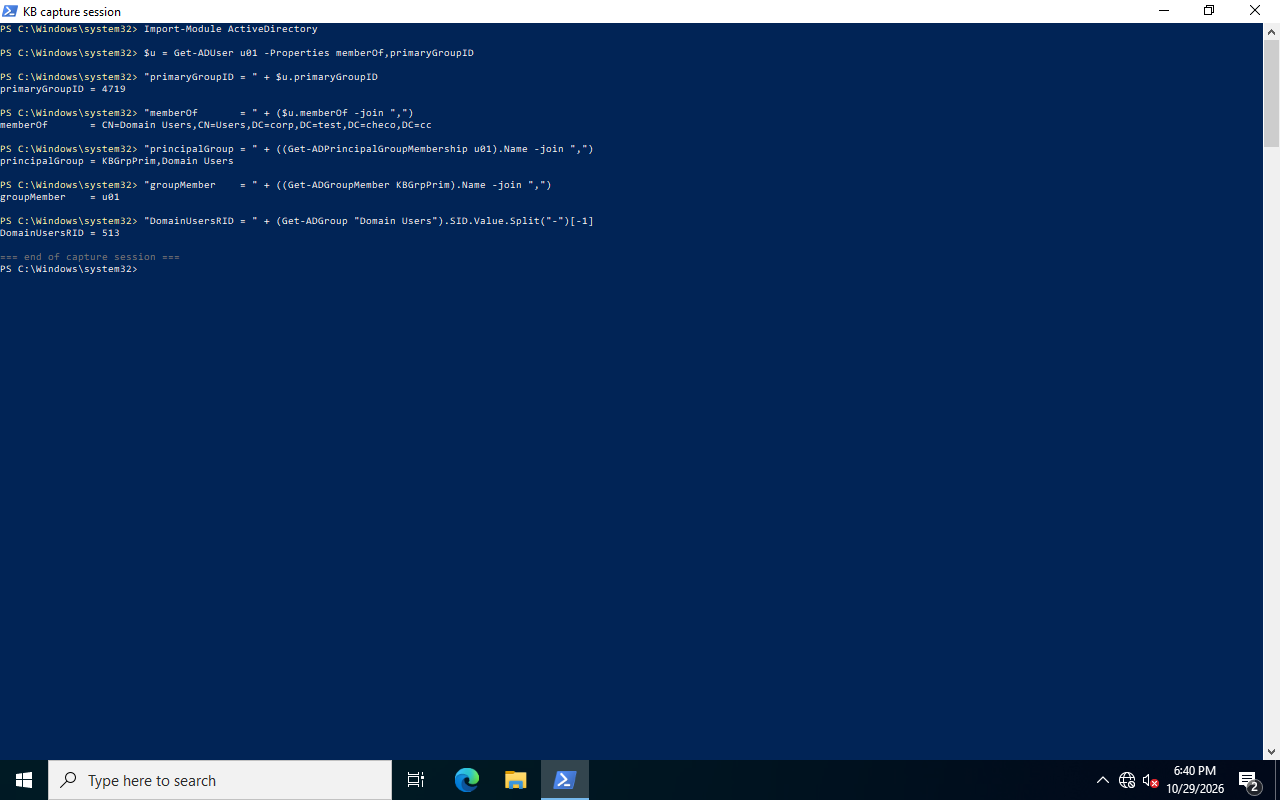
primaryGroupID 保存 RID,不是组名或 DN。比较时应拼出用户所属域的完整 SID,不能只比最后一个 RID,否则不同域中相同 RID 可能被误认为同一组。primaryGroupID 定义
Import-Module ActiveDirectory
$dc = 'LAB-DC1.corp.test.checo.cc'
$u = Get-ADUser u01 -Server $dc -Properties memberOf,primaryGroupID
$g = Get-ADGroup KBGrpPrim -Server $dc
$primarySid = '{0}-{1}' -f $u.SID.AccountDomainSid.Value,$u.primaryGroupID
[pscustomobject]@{
    DirectMember = @($u.memberOf) -contains $g.DistinguishedName
    PrimaryGroup = $primarySid -eq $g.SID.Value
    UserPrimaryGroupSid = $primarySid
    TargetGroupSid = $g.SID.Value
}
这段只分别检查直接成员与主组,不声称覆盖嵌套、跨域或最终文件授权。需要组 SID 视图时可按条件读取 tokenGroups;需要资源是否可访问的答案,仍要结合实际令牌、共享/NTFS ACL 和对应访问结果。
测试中 Get-ADGroupMember 返回了 u01,但这不能反向证明原始 member 属性仍保留主组成员链接。cmdlet 枚举与直接 LDAP 属性读取有不同语义,比较时要说明使用了哪一种入口。
实验还记录了试图直接移除当前主组成员时的 1374 错误:
Remove-ADGroupMember : The user cannot be removed from a group because the group is currently the user's primary group
    + FullyQualifiedErrorId : ActiveDirectoryServer:1374
恢复前先核对原 primaryGroupID 和普通成员关系。该实验恢复的是 Domain Users 的 513;实际迁移或 POSIX 兼容场景可能故意使用其他主组,不应统一改回 513。目录改动要用新登录会话验证令牌,旧进程不会自动换令牌。在线程模拟中启动 whoami 子进程也可能看到宿主进程令牌,不能据此否定线程模拟身份的组。
6. 同步验收
每次同步至少记录服务器、身份、命名上下文、作用域、过滤器、请求属性、页数、范围响应、唯一对象数及失败状态。分页或范围中断时,不执行依赖“完整快照”的删除操作。
本篇的查询示例是只读的,恢复重点是释放连接与撤销调试配置。原始造数实验则按记录 GUID 清理一次性用户、组与 OU;主组实验先恢复原主组和普通成员状态,再验证新会话与原 ACL。不要把生产服务器的 LDAP 限制调大作为客户端缺循环的修复。