
Windows Scheduled Task Troubleshooting
A scheduled task has at least three success boundaries: the scheduler accepts a request, an action process starts, and the business operation completes with a fresh result. SUCCESS from schtasks /run is a reason to continue tracing that chain, not to stop.
Using Windows Server 2022 and Windows 10 LTSC 2021, work through directory, instance policy, logon type, HKCU, and mapped-drive checks. Each branch captures the task's actual execution context before comparing it with a manual run.
1. Task definition
Confirm the full TaskPath and internal name; identical names can exist in different folders. Read the actual action, principal, settings, and latest result:
$name = 'NAD0820261009'
$taskPath = '\'
$t = Get-ScheduledTask -TaskName $name -TaskPath $taskPath -ErrorAction Stop
$t.Actions | Select-Object Execute,Arguments,WorkingDirectory
$t.Principal | Select-Object UserId,LogonType,RunLevel
$t.Settings | Select-Object MultipleInstances,ExecutionTimeLimit,StartWhenAvailable
Get-ScheduledTaskInfo -TaskName $name -TaskPath $taskPath |
    Select-Object LastRunTime,LastTaskResult,NumberOfMissedRuns
[xml]$xml = Export-ScheduledTask -TaskName $name -TaskPath $taskPath
$xml.Task.Principals.Principal
$xml.Task.Settings.MultipleInstancesPolicy
Compare executable versus arguments, working directory, identity/logon type, and existing-instance behavior. Record PowerShell version/bitness too; an administrator shell's PATH need not match the background process.
| Evidence | Interpretation |
|---|---|
| schtasks /run exits zero | Request succeeded; confirm an instance next |
| 0x41303 / 267011 | Has not run, not an application exit code |
| 0x41301 | Currently running |
| 0x41305 | No more scheduled runs, not a password failure |
| Application exits zero | Success by its own contract; check the result |
| 0x80070569 | Requested logon type not granted; inspect principal/batch rights |
Retain each field's raw value and decimal/hex representation. Do not interpret every nonzero result as a credential error. See Task Scheduler constants.
2. Working directory
NAD0820261009 ran job.ps1 as SYSTEM on Server 2022. An absolute -File path did not make Get-Content '.\input.txt' resolve against the script's directory.
| Scenario | Get-Location | Result | Fresh output |
|---|---|---|---|
| Manual child with explicit directory | C:\NAD0820261009 | Exit zero | quantity=7 |
| Task with the same WorkingDirectory | Same | LastTaskResult=0 | Present |
| Only WorkingDirectory cleared | C:\Windows\system32 | LastTaskResult=2 | Absent |
| Directory restored | C:\NAD0820261009 | LastTaskResult=0 | Restored |
The log showed PathNotFound, followed by an explicit exit 2 in catch. Two was this script's exit contract, not evidence that powershell.exe never started.
Instance cf1df54c-0b8e-4e1c-a933-d0d3d08722f0 had task/action starts 100/200, action completion 201, and task completion 102. Event 201 recorded 2147942402, or 0x80070002, while task information reported two. Preserve both raw values and the application log rather than assuming every event code is an unwrapped process exit code.
Program, input, identity, and script hash stayed fixed. Restoring working directory repaired the job. The UI's Start in field maps to WorkingDirectory; executable and arguments are separate fields. See action parameters.
This reviewed update preserves Execute/Arguments and changes one confirmed Exec action:
# For this confirmed single Exec action only; do not replace a multi-action task.
$name = 'NAD0820261009'; $taskPath = '\'
$t = Get-ScheduledTask -TaskName $name -TaskPath $taskPath
if ($t.State -eq 'Running') { throw 'Wait for the current run to finish.' }
if (@($t.Actions).Count -ne 1 -or -not $t.Actions[0].Execute) {
    throw 'Review this task separately; expected one Exec action.'
}
$backup = Join-Path $env:TEMP ('task-before-' + [guid]::NewGuid() + '.xml')
Export-ScheduledTask -TaskName $name -TaskPath $taskPath |
    Set-Content -LiteralPath $backup -Encoding Unicode
$old = $t.Actions[0]
$args = @{Execute=$old.Execute;WorkingDirectory='C:\NAD0820261009'}
if ($old.Arguments) { $args.Argument = $old.Arguments }
if ($old.Id) { $args.Id = $old.Id }
$a = New-ScheduledTaskAction @args
Set-ScheduledTask -TaskName $name -TaskPath $taskPath -Action $a | Out-Null
(Get-ScheduledTask -TaskName $name -TaskPath $taskPath).Actions |
    Select-Object Execute,Arguments,WorkingDirectory
Do not overwrite a multi-action array with one new action. Password-based registrations may require credentials again; handle that through task properties/the appropriate registration interface. An XML backup contains no account password.
If resources always sit beside the script, Join-Path $PSScriptRoot 'input.txt' is another design. External tools can still depend on process working directory, so fixing one Get-Content does not fix every relative path. The historical repair changed the task setting and kept the script identical.
3. Instance policy
KBEW0320261011 ran for eight seconds and logged a GUID, PID, and UTC start/end per execution. Idle requests completed normally. A second request about one second into a run produced no additional business record.
Its XML specified IgnoreNew; event 322 explicitly named the existing instance. The second request had events 325/110 but no new action process or result. LastTaskResult could still show the prior zero, which says nothing about the rejected request.
After changing the same task to Queue, two requests produced PIDs 3944 and 1544. Event 324 described queuing. The later process's 129 appeared about two milliseconds after the earlier 201; its business start followed the prior business end by roughly 0.093 seconds. Both completed.
| Policy | Request during an active run | Business concern |
|---|---|---|
| IgnoreNew | No additional instance | Appropriate if overlapping triggers can be discarded/coalesced |
| Queue | Wait until previous instances complete | Backlog, duration, and downtime recovery |
| Parallel | Start concurrently | Inputs, outputs, locks, idempotency |
| StopExisting | Stop old instance, then start new | Interrupted partial work |
These are admission policies, not a durable business-message queue with acknowledgments. If every work item must survive, let scheduling wake a consumer while durable work/state lives elsewhere. See MultipleInstancesPolicy.
The recorded change backed up configuration and read the XML before repeating the same two-request control:
$name = 'KBEW0320261011'; $taskPath = '\'
$backup = Join-Path $env:TEMP ('task-policy-' + [guid]::NewGuid() + '.xml')
Export-ScheduledTask -TaskName $name -TaskPath $taskPath |
    Set-Content -LiteralPath $backup -Encoding Unicode
$t = Get-ScheduledTask -TaskName $name -TaskPath $taskPath
if ($t.State -eq 'Running') { throw 'Change after the current run completes.' }
$t.Settings.MultipleInstances = 1 # Queue
Set-ScheduledTask -InputObject $t | Out-Null
[xml]$x = Export-ScheduledTask -TaskName $name -TaskPath $taskPath
$x.Task.Settings.MultipleInstancesPolicy
Verify two independent completed results, not merely LastTaskResult=0.
4. Logon type
KBTask on LTSC 2021 had principal Interactive, XML InteractiveToken, and Run only when user is logged on selected. kbtask had no interactive session. schtasks /run accepted the attempt, but the result stayed 0x41303 and no file appeared.
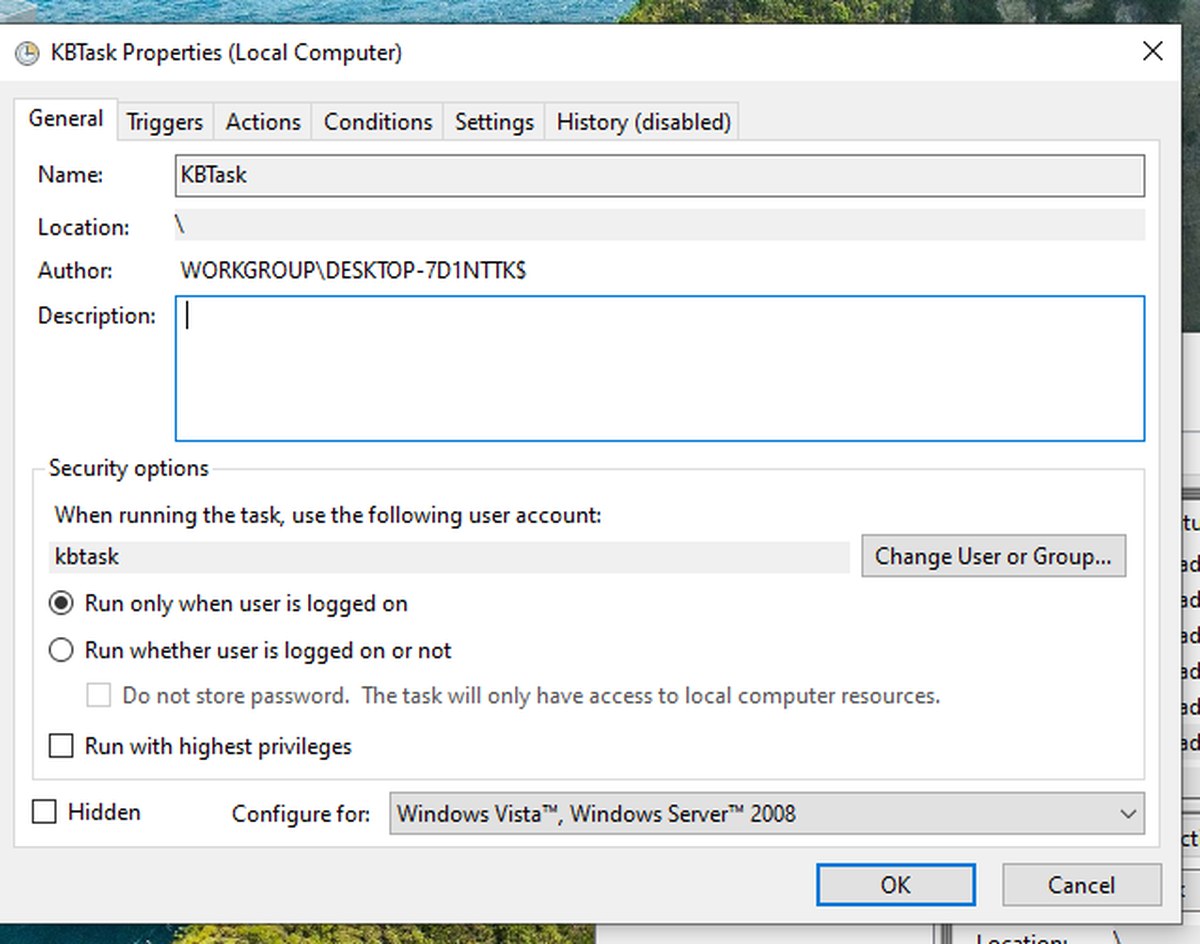
Changing the same account to Password mode allowed unattended output, password-run. That control also changed RunLevel to Highest, so it did not isolate password alone. The direct evidence for the interactive precondition is the principal, absent session, and absence of an action instance.
Do not generalize that omitting /rp always creates InteractiveToken: parameters, prompts, APIs, and the final definition matter. Unattended work also does not invariably require an ordinary stored-password account. SYSTEM/suitable service identities, managed accounts, or constrained S4U fit different requirements; S4U lacks equivalent network/encrypted-file access. Use least required privilege instead of making Highest the universal repair.
Inspect both Log on as a batch job and its deny counterpart, including the computer GPO that manages them. Another lab produced event 104 with 0x80070569 until SeBatchLogonRight was granted to the exact account. Preserve the rest of the list and do not treat one host's allowed groups as a universal default.
5. HKCU configuration
A Server 2022 configuration control used the same app.exe and auto/explicit logic. User KBEW0820261011 had an HKCU ConfigPath seed; SYSTEM's corresponding branch did not:
| Identity | Mode | Exit | Content |
|---|---|---|---|
| SYSTEM | auto, HKCU lookup | 2 | None |
| Dedicated user | auto | 0 | limit=50 |
| SYSTEM | explicit user-config path | 0 | limit=50 |
| Dedicated user | explicit path | 0 | limit=50 |
SYSTEM could read the explicit file; only automatic seed resolution failed. This excludes an NTFS denial for that tested read, not for all user-directory access.
Initializing SYSTEM's own configuration branch with a separate path made auto return zero and limit=200. Deleting the test seed returned two again. Matching configuration initialization to execution identity repaired this control.
Place equivalent diagnostics inside the actual action, sending output to its dedicated writable log folder:
# Add equivalent diagnostics to the real action, using a dedicated writable log folder.
$id = [Security.Principal.WindowsIdentity]::GetCurrent()
[pscustomobject]@{
    TimeUtc = [datetime]::UtcNow.ToString('o')
    PID = $PID
    Identity = $id.Name
    SID = $id.User.Value
    PowerShellLocation = [string](Get-Location)
    ProcessDirectory = [Environment]::CurrentDirectory
    UserProfile = $env:USERPROFILE
    AppData = $env:APPDATA
    PSVersion = [string]$PSVersionTable.PSVersion
    Is64Bit = [Environment]::Is64BitProcess
} | ConvertTo-Json
Get-ItemProperty 'HKCU:\Software\KBEW0820261011' -ErrorAction SilentlyContinue
net.exe use
Environment variables alone do not prove correct HKCU/profile loading. Services, scheduled tasks, and impersonation have different loading behavior. This batch task did load a user profile; do not claim all noninteractive contexts omit it. Impersonation also involves predefined-HKCU handle caching and appropriate user-registry APIs, not merely changing USERPROFILE.
Use explicit paths for centralized configuration, or initialize account-specific data under the real identity. Do not copy an administrator's HKCU indiscriminately. Registry::HKEY_USERS works without an HKU: drive; a missing drive is not a missing hive.
6. Elevation and mapped drives
A Windows 10 21H2 test with EnableLUA=1 compared one user's linked restricted/full tokens. The ordinary LogonId was 0:0x83ab6; elevated was 0:0x83a95. The ordinary process read R:\marker.txt. The elevated process had no R:, but reading the same file through UNC immediately returned MAPPED_DATA_OK. The original mapping remained usable in the ordinary window.
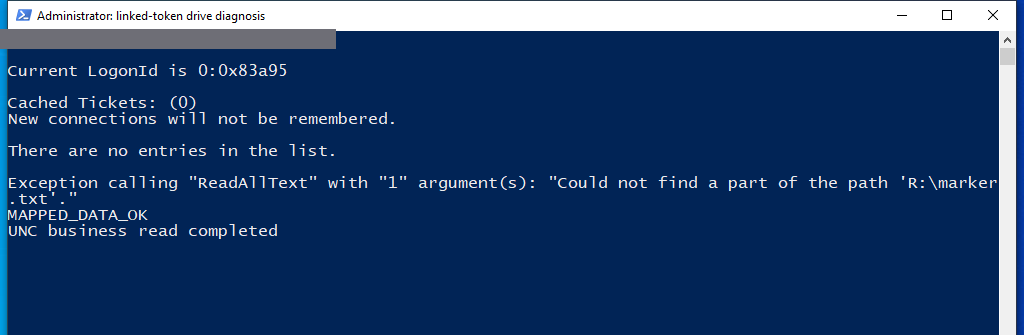
This used a local 127.0.0.1 share, not cross-host domain-service authentication. UNC repaired the observed namespace issue; a background job must still validate network credentials and both share/NTFS authorization as its actual identity. A shared username does not guarantee inherited desktop mappings. See Microsoft's mapped-drive explanation.
Use exact UNC paths where supported. Legacy drive-only applications need the specific mapping in their execution context after checking conflicts. EnableLinkedConnections changes machine-wide behavior and does not cover every additional credential-created session; it is not the first repair here.
7. Instance and result
Filter the full TaskName and preserve both possible instance fields:
$fullName = $taskPath + $name
$log = 'Microsoft-Windows-TaskScheduler/Operational'
(Get-WinEvent -ListLog $log).IsEnabled
Get-WinEvent -FilterHashtable @{
    LogName=$log;StartTime=(Get-Date).AddHours(-1)
} | ForEach-Object {
    $e = [xml]$_.ToXml(); $d = @{}
    foreach ($item in $e.Event.EventData.Data) {
        $d[[string]$item.Name] = [string]$item.'#text'
    }
    if ($d.TaskName -eq $fullName) {
        [pscustomobject]@{
            Time=$_.TimeCreated;Id=$_.Id;RecordId=$_.RecordId
            InstanceId=$d.InstanceId;TaskInstanceId=$d.TaskInstanceId
            ProcessId=$d.ProcessId;Action=$d.ActionName
            ResultCode=$d.ResultCode;Message=$_.Message
        }
    }
} | Sort-Object Time,RecordId | Format-List
Disabled historical logging cannot be reconstructed later. Action logs should include UTC start/end, unique RunId, PID, actual identity, resolved paths, exit code, and business result identity. Retain scheduler instance IDs alongside business RunIds instead of attaching another run's output to this request.
Start-ScheduledTask is asynchronous. Capture LastRunTime, existing instances, and the business-log position first; confirm a new instance before waiting for completion. Polling only for State!=Running races with an accepted but not-yet-started request, and short tasks can finish between polls. Concurrent instances also cannot be validated solely through one latest result.
Retest the same input and business identity: new resolved path/output for path issues, exact SID/HKCU for identity issues, new instance/outcome for logon issues, and the expected independent completion records for admission policy. Restore only changed fields against the exported baseline, supplying passwords separately and retaining results/events. Remove dedicated test objects only after the task is idle and child processes have exited.