
AD Audit Configuration and Logs
A 4728 event does not automatically identify the person who added a privileged member. Enabling Directory Service Access also does not make every attribute read generate 4662. Establish whether the required evidence can be produced, then correlate object identity, operation, and logon context.
The examples use the Windows Server 2022 DC LAB-DC1 in corp.test.checo.cc. Configure logon, account-management, and directory-access auditing, then verify the resulting records with dedicated objects for reads, group changes, and account lifecycle operations.
1. Select events
| Question | Events/subcategory | Additional conditions or limits |
|---|---|---|
| User creation, enable, disable, delete | 4720, 4722, 4725, 4726; User Account Management | Collect domain operations on their handling DCs; local accounts require their hosts |
| Global security-group add/remove | 4728, 4729; Security Group Management | 4728 does not cover every scope |
| Domain-local security-group add/remove | 4732, 4733; same subcategory | Retain the complete group SID |
| Universal security-group add/remove | 4756, 4757; same subcategory | The member can itself be a group |
| AD object access | 4662; Directory Service Access | Must also match the object's SACL principal, rights, and outcome |
| Attribute-value change | 5136; Directory Service Changes | Requires appropriate auditing; differs from an access event |
| Logon context | 4624; Logon | Correlate on the event's machine, subject to retention/collection |
No additional 5136 experiment was performed for this article. It is listed to distinguish an access-right operation from an attribute's old/new values. See 5136 modification semantics.
2. Check audit policy
The first lab started with Logon=Success and Failure and no SCENoApplyLegacyAuditPolicy value. A test GPO set legacy AuditLogonEvents=2; after policy refresh, Logon became Failure. A dedicated account made one successful and one failed connection. The successful command returned zero, but only 4625 was recorded, with no matching 4624.
The experiment then set the force-subcategory option to one and Logon to Success. It remained Success through refresh, and the successful operation produced 4624. After removing the experiment and restoring its original success/failure baseline, both events appeared again.
That demonstrates override in the tested configuration. It does not establish that all modern Windows defaults disable subcategory precedence: Microsoft's documented effective default is Enabled. Inspect the actual machine. In the managing GPO, explicitly enable Audit: Force audit policy subcategory settings … to override audit policy category settings, and leave legacy audit settings Not Configured. No Auditing is not Not Configured. See the security option.
Read before changing:
# On the target DC; GUIDs avoid localized subcategory-name differences.
auditpol.exe /get /subcategory:'{0CCE9215-69AE-11D9-BED3-505054503030}' /r
auditpol.exe /get /subcategory:'{0CCE9235-69AE-11D9-BED3-505054503030}' /r
auditpol.exe /get /subcategory:'{0CCE9237-69AE-11D9-BED3-505054503030}' /r
auditpol.exe /get /subcategory:'{0CCE923B-69AE-11D9-BED3-505054503030}' /r
reg.exe query 'HKLM\SYSTEM\CurrentControlSet\Control\Lsa' /v SCENoApplyLegacyAuditPolicy
gpresult.exe /scope computer /h "$env:TEMP\ad-audit-gpresult.html"
wevtutil.exe gl Security
The GUIDs identify Logon, User Account Management, Security Group Management, and Directory Service Access. Compare return codes, readback, policy results, and new controlled events. Use a dedicated account and bounded failed attempts below lockout thresholds; do not embed real passwords in command lines.
Manually editing SYSVOL templates or extension registration risks inconsistent AD/SYSVOL versions and client-extension metadata. Manage and back up policy through GPMC, checking OU scope, security filtering, replication, and results. A domain-root GPO normally can inherit into the Domain Controllers OU; it is incorrect to assume such links inherently exclude DCs.
Missing logs also require checking DC selection, timestamps/time zones, overwriting, and forwarding loss. No match is not proof of no operation. Log size/retention configuration alone cannot prove one specific record is still present.
3. 4662 prerequisites
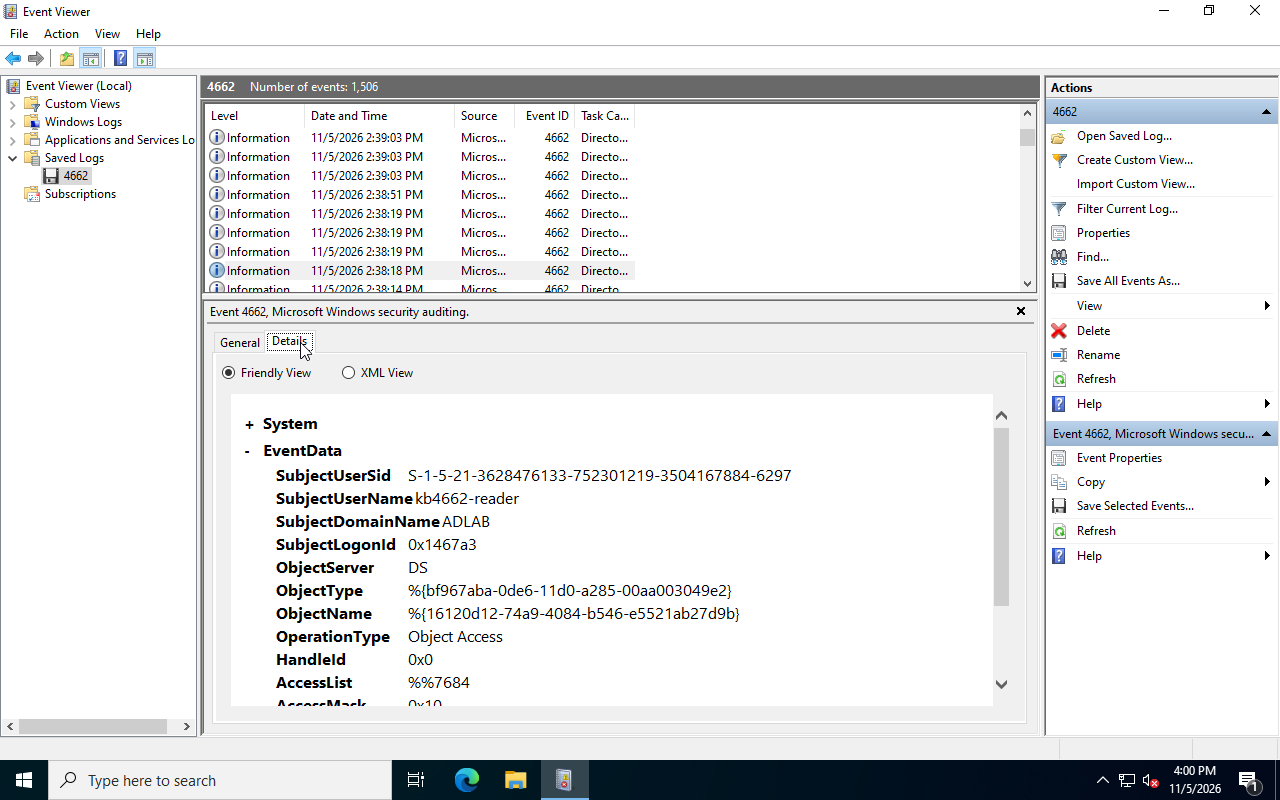
The read experiment used kb4662-target and ordinary reader kb4662-reader. Initially only inherited write auditing existed. Reading department succeeded without a corresponding read event. After adding explicit successful ReadProperty auditing:
| Subcategory | Read audit ACE present | Matching read events |
|---|---|---|
| Success | No | 0 |
| No Auditing | Yes | 0 |
| Success | Yes | 2 |
| Success | Removed experimental ACE | 0 |
Two is the observed count, not a fixed LDAP-query ratio. Adding the SACL did not grant DACL permission: audit selection and authorization are separate.
The successful record included:
SubjectUserName = kb4662-reader
SubjectLogonId = 0x1467a3
ObjectServer = DS
ObjectType = %{bf967aba-0de6-11d0-a285-00aa003049e2}
ObjectName = %{16120d12-74a9-4084-b546-e5521ab27d9b}
AccessMask = 0x10
Here ObjectType represented the user class and ObjectName used the object's GUID. Searching only its former DN misses that representation; preserve other representations rather than forcing every value into a GUID. 0x10 is ReadProperty; 0x20 is WriteProperty. Properties can include property-set or extended-right GUIDs, not only individual attributes. See 4662 conditions and access masks.
4. Configure object SACLs
The original lab used Everyone/all-property read auditing for visibility. Do not deploy that indiscriminately across a business directory. This reviewed narrower example audits only the dedicated reader's successful department read on one test object; it is not the configuration historically executed:
# Use a dedicated test object and an AD: drive connected to the intended DC.
# Reading/writing the SACL requires appropriate audit-security privileges.
$dn = 'CN=kb4662-target,OU=KB-T10,DC=corp,DC=test,DC=checo,DC=cc'
$path = 'AD:\' + $dn
$beforeAcl = Get-Acl -LiteralPath $path -Audit -ErrorAction Stop
$beforeAcl.Audit | Format-Table IdentityReference,ActiveDirectoryRights,
    AuditFlags,ObjectType,IsInherited -AutoSize

# Look up the property GUID instead of hard-coding an unverified GUID.
$dc = 'LAB-DC1.corp.test.checo.cc'
$schema = (Get-ADRootDSE -Server $dc).schemaNamingContext
$attr = @(Get-ADObject -Server $dc -SearchBase $schema `
    -LDAPFilter '(&(objectClass=attributeSchema)(lDAPDisplayName=department))' `
    -Properties schemaIDGUID)
if ($attr.Count -ne 1) { throw 'Expected exactly one department attribute.' }
$propertyGuid = New-Object System.Guid (,$attr[0].schemaIDGUID)
$reader = Get-ADUser kb4662-reader -Server $dc
$rule = New-Object System.DirectoryServices.ActiveDirectoryAuditRule(
    $reader.SID,
    [System.DirectoryServices.ActiveDirectoryRights]::ReadProperty,
    [System.Security.AccessControl.AuditFlags]::Success,
    $propertyGuid,
    [System.DirectoryServices.ActiveDirectorySecurityInheritance]::None)
# Inspect for an equivalent pre-existing rule before adding anything.
# Record this rule's SID, right, flags, GUID, inheritance, and the prior SACL.
$beforeAcl.AddAuditRule($rule)
Set-Acl -LiteralPath $path -AclObject $beforeAcl -ErrorAction Stop
(Get-Acl -LiteralPath $path -Audit).Audit |
    Format-Table IdentityReference,ActiveDirectoryRights,AuditFlags,ObjectType,IsInherited
Confirm the AD: provider's DC independently. A Get-ADUser -Server argument does not rebind the drive. Save the original SACL and inspect equivalent rules before adding. If the rule already existed, do not add it or later remove it as an experimental change.
Read department in a separate session as the ordinary reader, confirm the value, and locate the matching subject, object, and read mask on the DC handling the request. A negative control can read a property outside the new rule, but existing inherited auditing may still record that operation; do not require the total event count to be zero mechanically.
Cleanup removes only the exact rule actually introduced, using RemoveAuditRuleSpecific against a freshly read ACL. Preserve the DACL, other explicit SACL entries, and inherited entries. Removing every IsInherited=False audit entry would delete unrelated business rules. Replacing an entire old descriptor can also overwrite concurrent changes; compare before restoring.
5. Group events
Adding one test user to three dedicated security groups produced:
14:46:33.424  4728  kb4728-g-global       SID ...-6423
14:46:35.470  4732  kb4728-g-domainlocal  SID ...-6424
14:46:37.494  4756  kb4728-g-universal    SID ...-6425
A separate historical control briefly added the test account to Domain Admins: 4728 at 14:45:22.830, followed by 4729 at 14:45:26.910. Both had SubjectLogonId=0xd3bd1. Routine validation does not need real privileged membership; dedicated groups establish event coverage.
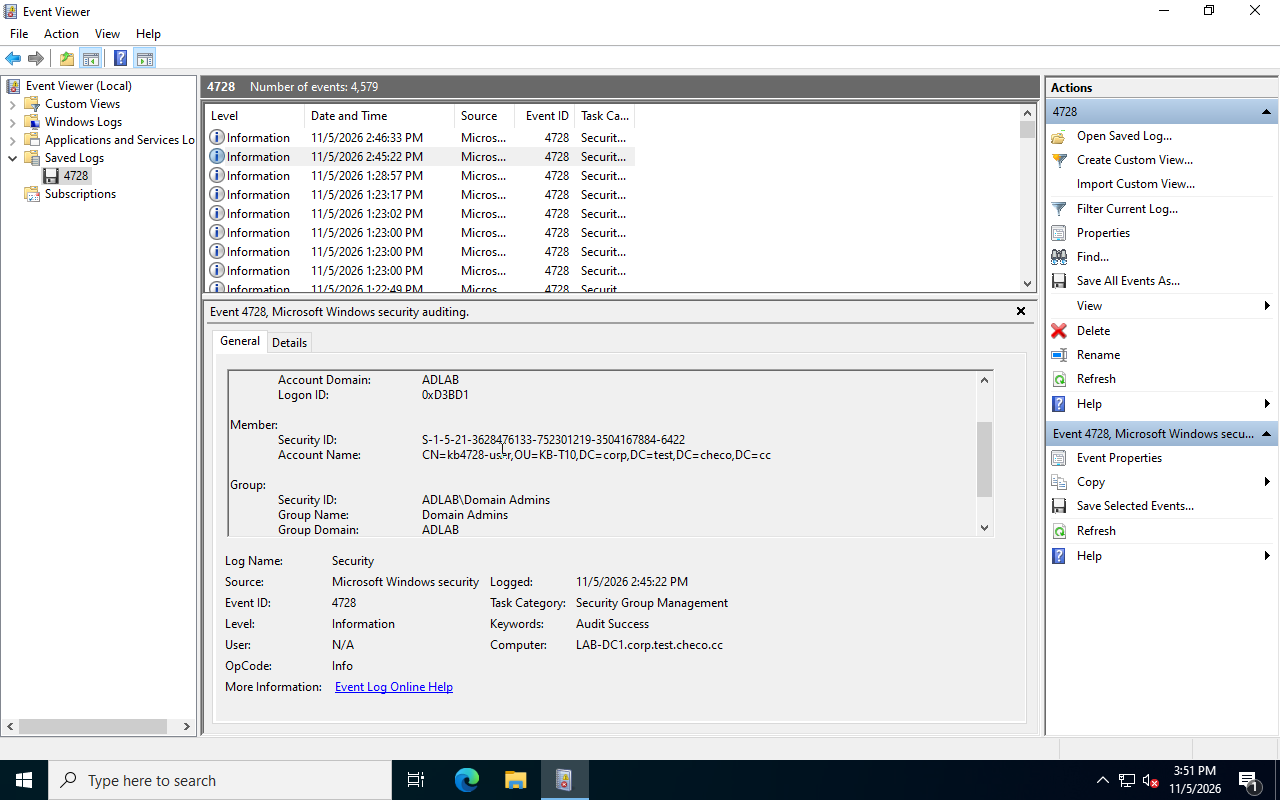
TargetSid identifies the changed group; MemberSid identifies the added/removed member; Subject is the calling identity. Alert on complete group SIDs. Matching only suffix 512 confuses Domain Admins in different domains; BUILTIN Administrators is S-1-5-32-544. Names can change, but domain boundaries must remain.
If the member is another group, evaluate membership at the relevant historical time. Expanding it today produces current membership, not automatically historical impact. A 4729 records one successful removal; read back the exact current direct relationship separately. Ending privilege use by existing sessions is another acceptance question.
6. Correlate logons
This helper runs on the event's DC and retains machine, millisecond timestamp, record ID, and version. No matching event is a query result; permission/channel failures must remain errors:
# Execute on the DC being investigated, with access to its Security log.
function Read-SecurityEventData {
    param([int[]]$Id,[datetime]$Start,[datetime]$End)
    Get-WinEvent -FilterHashtable @{
        LogName='Security';Id=$Id;StartTime=$Start;EndTime=$End
    } -ErrorAction Stop | ForEach-Object {
        $xml = [xml]$_.ToXml()
        $row = [ordered]@{
            Computer=$_.MachineName;Time=$_.TimeCreated
            Id=$_.Id;RecordId=$_.RecordId;Version=$xml.Event.System.Version
        }
        foreach ($d in $xml.Event.EventData.Data) {
            $row[[string]$d.Name] = [string]$d.'#text'
        }
        [pscustomobject]$row
    }
}
$start = (Get-Date).AddHours(-2)
$end = Get-Date
$rows = @(Read-SecurityEventData -Id @(4720,4722,4725,4726,4728,4729,4732,4733,4756,4757,4662) `
    -Start $start -End $end)
$rows | Sort-Object Time,RecordId |
    Select-Object Computer,Time,Id,RecordId,SubjectUserSid,SubjectUserName,
        SubjectLogonId,TargetSid,MemberSid,ObjectName,AccessMask
Choose the precise member SID before joining:
$memberSid = 'S-1-5-21-3628476133-752301219-3504167884-6422'# Select one exact change, then correlate on the same machine/logon lifetime.
$change = $rows | Where-Object { $_.Id -eq 4728 -and $_.MemberSid -eq $memberSid } |
Sort-Object Time | Select-Object -Last 1
if (-not $change) { throw 'No matching group change in this window.' }
$logons = @(Read-SecurityEventData -Id 4624 -Start $start -End $end)
$logons | Where-Object {
$_.Computer -eq $change.Computer -and
$_.TargetLogonId -eq $change.SubjectLogonId -and
$_.Time -le $change.Time
} | Sort-Object Time | Select-Object Computer,Time,RecordId,TargetUserSid,
TargetUserName,TargetLogonId,LogonType,AuthenticationPackageName,IpAddress,ProcessNameThe two-hour window may exclude the start of a long-running session. Expand it within retention limits rather than interpreting zero matches as no source. A LUID is meaningful on its machine within the relevant boot lifetime, not a globally unique cross-machine/reboot key.
The historical 0xd3bd1 matched a Type 3 logon named LAB-DC1$, SID S-1-5-18, Kerberos, and a dash for IpAddress. That is consistent with this lab's independently known SYSTEM automation context. Empty IP, machine identity, or VirtualAccount alone does not prove one person, one process, or local loopback.
Another network logon, kbjoin, recorded 10.77.77.20. This identifies that authentication context's network source, not necessarily a human's endpoint behind management platforms, jump hosts, or proxies. Type 5 denotes service; scheduled tasks commonly use Batch=4. The same LUID does not guarantee one human, nor different LUIDs different humans.
Continue with platform job logs, script records, 4688/process telemetry, remote-session history, and change records. State evidence gaps rather than manufacturing a human identity from one successful logon join.
7. Account lifecycle
The account experiment recorded:
| Time | Event | Object |
|---|---|---|
| 14:43:36.262 | 4720 creation | kb4720-user |
| 14:43:39.283 | 4722 enable | Same SID |
| 14:43:42.295 | 4725 disable | Same SID |
| 14:43:45.323 | 4726 delete | Same SID |
Another New-ADUser -Enabled $true invocation produced 4720 and 4722 within 17 milliseconds. Count creations by creation event/target SID, not by adding enable events again. Other tools need not implement account creation with an identical event pair.
The objects had userAccountControl=512/514 while creation events showed NewUacValue=0x11. That does not make the log unreliable: the event uses SAM account-flag encoding, different from AD userAccountControl. Nor is one creation event a complete post-command snapshot. Follow later events and read the current object for current state. See 4720 UAC encoding.
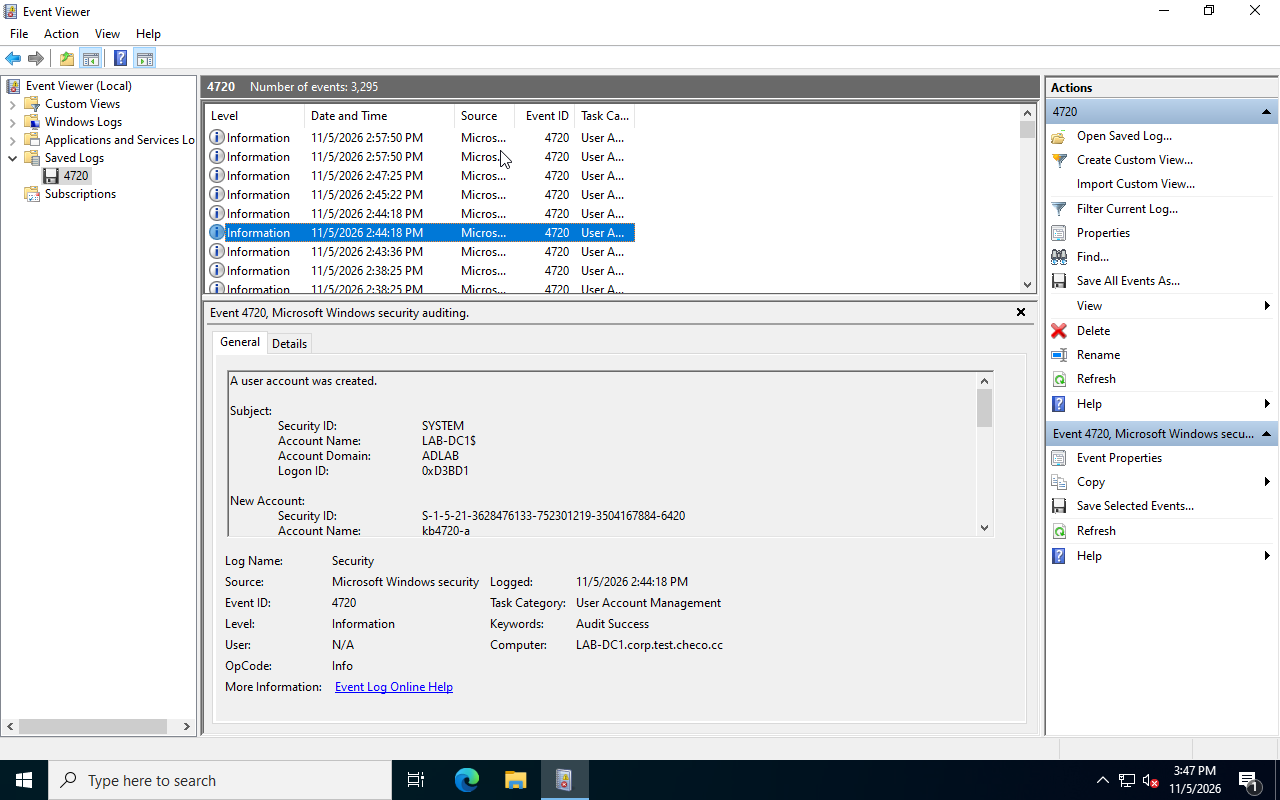
Use TargetSid across deletion history to avoid confusing same-name recreation. A 4726 establishes deletion at that time, not permanent absence today: restore/recreation may follow. A failed Get-ADUser also needs DC, replication, rights, and query-path checks; it is not a complete historical account.
8. Audit validation
Save auditpol backups, GPO reports, registry value presence, original SACLs, and test identities. In the dedicated OU, exercise create/enable/disable/delete, membership add/remove across the three scopes, and the read-audit four-state matrix. Retain command outcomes and matching events without fixed-count assumptions or interpreting silence as no action.
Restore the managing GPO baseline and only the introduced SACL/membership changes, refresh, and verify baseline events again. Removing a link does not guarantee all security settings revert. Do not zero legacy values without checking their original state. Collect from relevant DCs and hosts holding local accounts, with retention/forwarding sized for the query rate. Otherwise correct investigation methods can still lack the required evidence later.