
Windows MSI Installation and Maintenance
An MSI update can succeed while the program remains old. An application can exist while SYSTEM reports an unknown product. A cached MSI can remain present while repair asks for original media. Separate product instance, source media, and file replacement decisions.
The examples use Windows 10 Enterprise 21H1 (19043.2364) and Windows Installer 5.0. Source Report illustrates source resolution, Version Report illustrates file replacement, and Report illustrates per-user context. These are different products; substitute the exact identity and paths of the product being maintained.
1. Product identity and versions
| Information | Purpose |
|---|---|
| ProductCode | Identifies a product, still requiring context/SID |
| PackageCode | Identifies a particular MSI, beyond its filename |
| ProductVersion | Registered product update level |
| EXE FileVersion | Participates in file replacement decisions |
| Context and user SID | Selects the installed user/machine instance |
| InstallSource, LocalPackage | Source location versus cached database |
| Actual executable path, hash, output | Establishes what finally ran |
Save the command, caller identity, full log, and business configuration before choosing repair, update, or context migration. A display-name entry does not establish SYSTEM maintainability.
2. Missing repair source
Source Report used Report.msi and external payload.cab, producing REPORT_TOTAL=42. Moving its source did not initially affect the installed executable. Removing that EXE and repeating repair then failed:
| Condition | Repair | Business result |
|---|---|---|
| Source available, EXE missing | Zero | Restored, output 42 |
| Source moved, EXE intact | No maintenance | Still output 42 |
| Source moved, EXE missing again | 1603; inner 1706 | Still missing |
| Original byte-identical media restored | Zero | File/output restored |
The verbose log recorded:
SOURCEMGMT: Source is invalid due to missing/inaccessible package.
SOURCEMGMT: Failed to resolve source
Error 1706. An installation package for the product Source Report cannot be found. Try the installation again using a valid copy of the installation package 'Report.msi'.
The cached database does not guarantee this package's external payload is cached. Do not delete %windir%\Installer or supply any same-name MSI. A replacement Report.msi with different ProductCode/PackageCode was also rejected, now for invalid package/product code.
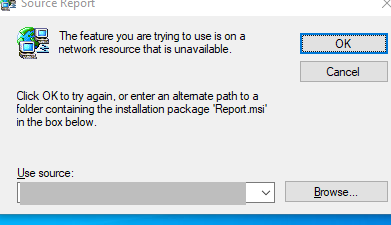
Network resource is generic dialog wording; the original source can be local. Use actual paths and package identity from the log.
For this machine-level test product, query maintenance metadata:
$ErrorActionPreference='Stop';$ProgressPreference='SilentlyContinue'
$Product='{61FBFAE5-E491-42CC-A4B9-ACF45C6D7702}'
$Source='C:\SourceReport\source'
$Exe='C:\Program Files (x86)\SourceReport\Report.exe'
$Log='C:\SourceReport\fix-repair.log'
$Installer=New-Object -ComObject WindowsInstaller.Installer
$Installer.ProductInfo($Product,'ProductName')
$Installer.ProductInfo($Product,'VersionString')
$Installer.ProductInfo($Product,'InstallSource')
$Installer.ProductInfo($Product,'LocalPackage')
Get-Item -LiteralPath "$Source\Report.msi","$Source\payload.cab"|Select-Object Name,Length
The recorded product was 1.0.0, source C:\SourceReport\source, with a 32768-byte MSI and 1412-byte CAB. Those lengths describe the sample, not arbitrary replacement validity. Restore complete trusted media for that release, retaining external CAB/uncompressed-file layout. If permanently relocating it, use supported source selection/list updates rather than internal Installer registry edits. See source resiliency.
1603 summarizes a failed transaction. Inspect the failed action around/before Return value 3, SOURCEMGMT, paths, and specific errors. Here 1706 explained source resolution, not every possible 1603.
3. Old files after an update
Version Report began with ProductVersion=1.0.0, Report.exe FileVersion=1.0.0.0, output 42. The update registered product 1.1.0 and contained new logic returning 84, but still labeled the EXE 1.0.0.0.
After REINSTALL=ALL REINSTALLMODE=vomus:
| Item | Initial | Faulty update | Corrected update |
|---|---|---|---|
| ProductVersion | 1.0.0 | 1.1.0 | 1.2.0 |
| Main FileVersion | 1.0.0.0 | 1.0.0.0 | 1.2.0.0 |
| Main output | 42 | 42 | 84 |
| Helper version | 1.0.0 | 1.1.0 | 1.2.0 |
| User configuration | Initial | customer-preserved | customer-preserved |
| Installer exit | 0 | 0 | 0 |
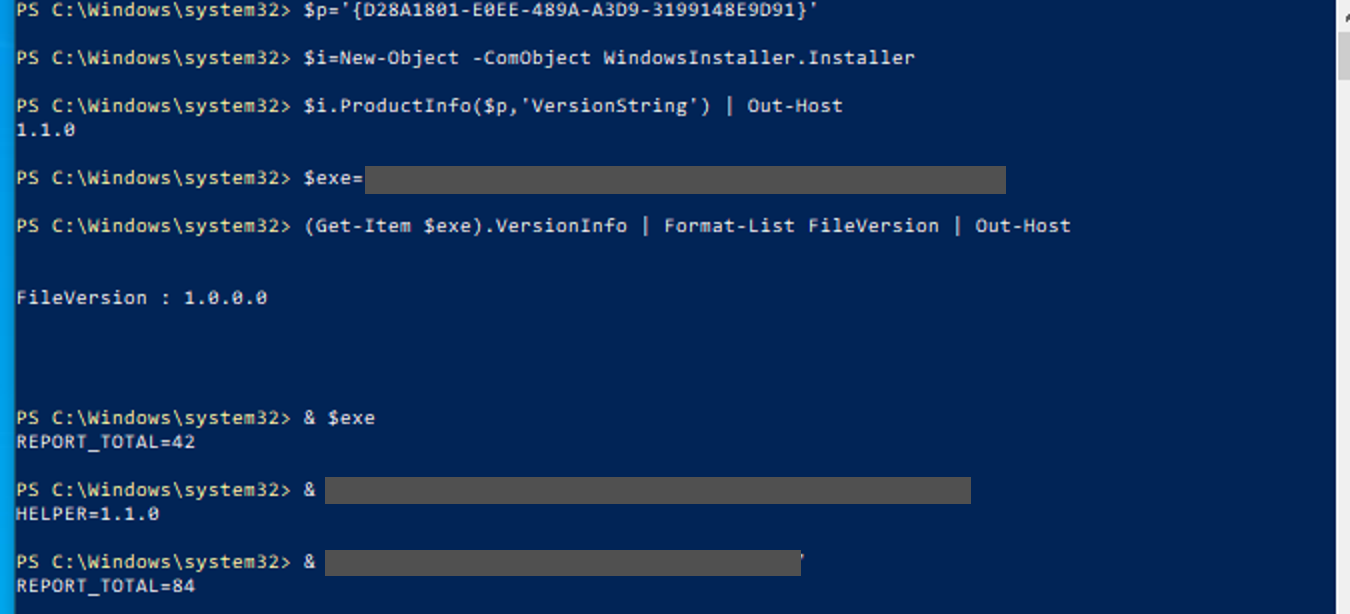
The log distinguished three files:
MSI (s) (6C:30) [07:09:19:029]: File: C:\Program Files (x86)\VersionReport\Helper.exe;	Overwrite;	Won't patch;	Existing file is a lower version
MSI (s) (6C:30) [07:09:19:029]: File: C:\Program Files (x86)\VersionReport\Report.exe;	Won't Overwrite;	Won't patch;	Existing file is of an equal version
MSI (s) (6C:30) [07:09:19:029]: File: C:\Program Files (x86)\VersionReport\settings.ini;	Won't Overwrite;	Won't patch;	Existing file is unversioned but modified
The transaction ran and Helper changed. Equal-version Report was retained under o; modified unversioned configuration was retained too. The installed main hash still matched the initial file while the package's EXE directly returned 84. This localized the issue beyond a wrong shortcut or old running process. See file versioning rules.
Inspect the real executable rather than product registration alone:
$ErrorActionPreference='Stop';$ProgressPreference='SilentlyContinue'
$Product='{D28A1801-E0EE-489A-A3D9-3199148E9D91}'
$Dir='C:\Program Files (x86)\VersionReport'
$Installer=New-Object -ComObject WindowsInstaller.Installer
$Installer.ProductInfo($Product,'VersionString')
Get-Item -LiteralPath "$Dir\Report.exe","$Dir\Helper.exe"|ForEach-Object {
    [pscustomobject]@{Name=$_.Name;FileVersion=$_.VersionInfo.FileVersion}
}
& "$Dir\Report.exe"
& "$Dir\Helper.exe"
Get-Content -LiteralPath "$Dir\settings.ini"
$Log='C:\VersionReport\fault-update.log'
Select-String -Path $Log -Pattern 'Report.exe;','Helper.exe;','settings.ini;'|ForEach-Object Line
If the component/feature was not selected, investigate selection, conditions, and upgrade type first. If disk content changed but running behavior did not, inspect old processes/other copies. Follow FilesInUse, deferred replacement, and reboot evidence when present. This control had neither file locks nor pending replacements.
4. Fix file versions
The sample kept ProductCode, component GUIDs, KeyPath, location, and feature tree stable while updating PackageCode/ProductVersion and the file under applicable minor-upgrade rules. Corrected Report.exe=1.2.0.0 installed through the same maintenance options, matched the new hash, returned 84, and preserved customer configuration.
REINSTALLMODE o does not overwrite everything; e includes equal/older versions, a forces reinstallation, and v includes source/recaching behavior. REINSTALL selects features. Do not force every file simply to conceal missing executable versioning, particularly when customer configuration shares the package. See REINSTALLMODE.
This reviewed launcher handles reboot outcomes for the sample's paths/options; it is not a universal MSI upgrade command:
# Example for the recorded machine-level Version Report product.
# Package/log directories must exist; preserve vendor-supported upgrade options.
$Package = 'C:\VersionReport\v3-fixed\Report.msi'
$Log = 'C:\VersionReport\fix-update.log'
$arguments = '/i "{0}" REINSTALL=ALL REINSTALLMODE=vomus /qn /norestart /l*v "{1}"' -f $Package,$Log
$p = Start-Process msiexec.exe -ArgumentList $arguments -PassThru
if (-not $p.WaitForExit(60000)) {
    throw "Maintenance is still running: PID=$($p.Id); inspect it and $Log before retrying."
}
switch ($p.ExitCode) {
    0    { 'Maintenance succeeded.' }
    3010 { 'Maintenance succeeded; restart required before final acceptance.' }
    1641 { 'Maintenance succeeded and initiated a restart; check the host state.' }
    default { throw "Maintenance failed: $($p.ExitCode); inspect $Log" }
}
Sixty seconds is the small package's observation limit. Timeout does not stop maintenance or authorize immediate retry. Do not reinstall on 3010; do not equate zero with completed business acceptance. Follow vendor-supported update procedures, especially for component restructuring, path changes, or major upgrades.
5. Installation context
Dual-purpose product F3E97934-C326-451C-B55C-981B794EAF42 worked for its original user with total=42. SYSTEM's MACHINE-only enumeration found nothing and repair returned 1605, ERROR_UNKNOWN_PRODUCT. Administrator cross-user enumeration still found it:
| Check | Per-user instance | After supported machine migration |
|---|---|---|
| MACHINE enumeration | No match | Context=4, empty SID |
| Cross-user enumeration | Context=2, original SID | Context=4 |
| SYSTEM repair of original | 1605 | Machine instance maintainable |
| Original-user repair | Zero | Original instance previously removed |
| Business | Original user total=42 | User and SYSTEM total=42 |
Context two is USERUNMANAGED; four is MACHINE; one is USERMANAGED. END=259 ends enumeration; inspect preceding successful rows before deciding no product exists.
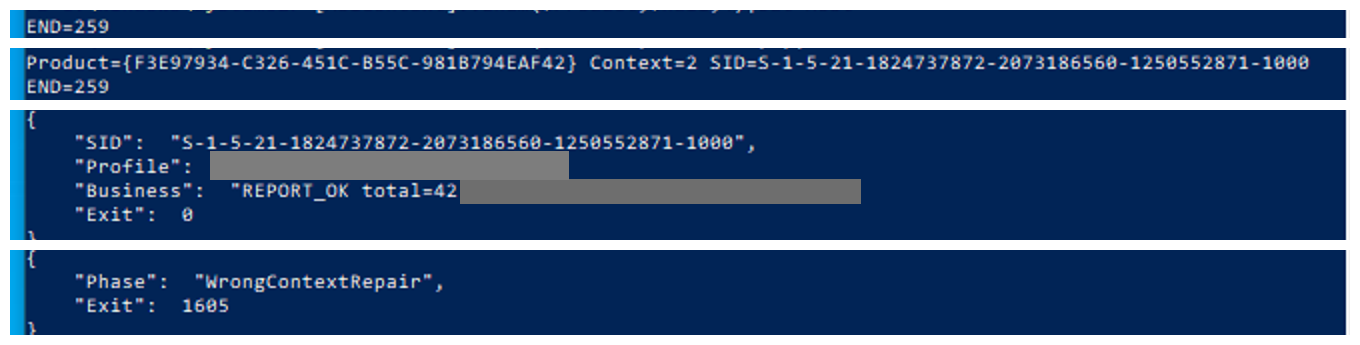
Use a targeted Installer API rather than Win32_Product, which can initiate consistency checks:
$ErrorActionPreference='Stop'
Add-Type -TypeDefinition @'
using System;
using System.Text;
using System.Runtime.InteropServices;
using System.ComponentModel;
public class ProductContext {
 [DllImport("msi.dll",CharSet=CharSet.Unicode)]
 static extern uint MsiEnumProductsEx(string product,string sid,uint context,uint index,StringBuilder code,out uint found,StringBuilder foundSid,ref uint length);
 public static string Find(string product,string sid,uint context) {
  if(String.IsNullOrEmpty(sid)) sid=null;
  var text=new StringBuilder();
  for(uint i=0;;) {
   uint found,n=8;
   var code=new StringBuilder(39);
   var owner=new StringBuilder((int)n);
   uint rc=MsiEnumProductsEx(product,sid,context,i,code,out found,owner,ref n);
   if(rc==234) {
    owner=new StringBuilder((int)n+1);n=(uint)owner.Capacity;
    rc=MsiEnumProductsEx(product,sid,context,i,code,out found,owner,ref n);
   }
   if(rc==259) {text.Append("END=259");break;}
   if(rc!=0) throw new Win32Exception((int)rc);
   text.AppendLine("Product="+code+" Context="+found+" SID="+owner);
   i++;
  }
  return text.ToString();
 }
}
'@
$Product='{F3E97934-C326-451C-B55C-981B794EAF42}'
[ProductContext]::Find($Product,$null,4)
[ProductContext]::Find($Product,'S-1-1-0',7)
Machine scope requires native NULL SID, not SYSTEM's SID. S-1-1-0 requests all users with appropriate administrative access. The helper normalizes an empty managed string back to NULL to avoid PowerShell/.NET binding ambiguity. Retry the same index on 234, advance on zero, finish on 259, and retain other errors instead of turning them into absence. See MsiEnumProductsExW.
6. User and machine deployment
For continued per-user deployment, record ProductCode/context/SID and maintain through the original user or its controlled execution environment:
msiexec.exe /fomus {F3E97934-C326-451C-B55C-981B794EAF42} /qn /norestart /l*v C:\Logs\owner-repair.logThat repair returned zero versus SYSTEM's 1605. Copying a profile directory or populating SYSTEM's HKCU does not create the original maintenance context.
For machine deployment, confirm dual-purpose authoring. ALLUSERS=2 with MSIINSTALLPERUSER=1 requests per-user; an empty latter property requests machine scope. These switches cannot convert any arbitrary third-party package. See installation context and MSIINSTALLPERUSER.
Existing-instance maintenance retains its context. Preserve business configuration, uninstall legitimately as the original user, verify its SID/context is gone, then reinstall using the supported mode:
msiexec.exe /i C:\Packages\Report.msi ALLUSERS=2 MSIINSTALLPERUSER="" /qn /norestart /l*v C:\Logs\machine-install.logThis is cmd syntax; preserve the empty quoted argument correctly in the actual shell rather than assuming PowerShell 5.1 native forwarding is identical. The recorded user repair/uninstall and machine install all returned zero. ALLUSERS normalized to one; API enumeration showed only Context=4; both original-user and SYSTEM business checks passed.
Migration changes installation, registration, and configuration scope. Do not manufacture machine-level state by moving payloads, editing Installer registration, or deleting caches.
7. Maintenance and rollback
Acceptance includes the correct instance, installer/reboot outcome, actual EXE path/version/hash, business operations, and preserved customer configuration. Archive valid media and external payloads so future maintenance can resolve its source.
Rollback follows supported uninstall/reinstall or vendor recovery, after backing up business data/configuration. Transaction rollback differs from restoring an old release days later. Copying an old EXE over a newly registered/component-managed product is not a complete downgrade. Remove only dedicated test products/directories and preserve installation logs/media evidence.