
IIS Request and Configuration Troubleshooting
A 405 response, rejected upload, or 500.19 on one directory can occur before application code runs. Read the module, notification stage, substatus, and HRESULT, then inspect effective configuration at the exact application scope before changing routes or filesystem rights.
The examples use Windows 10 Enterprise 21H1 19043.2364 and IIS 10, with ASP.NET Framework 4.x handlers in the integrated v4.0 pipeline. Diagnose WebDAV method conflicts, upload limits, and static-directory inheritance separately. ASP.NET Core/Kestrel needs its own request-limit configuration.
1. Locate the response source
| Symptom | Recorded evidence | Direction |
|---|---|---|
| PUT/DELETE 405 | WebDAVModule, MapRequestHandler, no business header | Module/handler inheritance |
| POST 405 | RecordApi header, APP-METHOD-REJECTED | Intentional application rejection |
| Large body rejected | RequestFilteringModule, 413.1 | IIS byte limit |
| Application body-read exception | Maximum request length exceeded | Framework request limit |
| Child path 500.19 | 0x80070021 | Section locking/delegation |
| Child path 500.19 | 0x800700b7 | Duplicate inherited collection key |
Inspect detailed errors in a controlled server troubleshooting context rather than exposing paths/configuration remotely. Retain URL, method, size, timestamp, and application evidence for the same request, not just a large status label.
2. WebDAV 405
record.ashx used RecordHandler with all methods allowed: PUT stored a value, GET read it, DELETE removed it. With inherited WebDAV, GET reached code while PUT/DELETE returned:
HTTP Error 405.0 - Method Not Allowed
Module:       WebDAVModule
Notification: MapRequestHandler
Handler:      RecordHandler
Error Code:   0x00000000
Handler=RecordHandler did not prove application execution. WebDAVModule failed at MapRequestHandler, without the application's X-Business-Handler: RecordApi header. GET/MISSING and POST/APP-METHOD-REJECTED did include that header.

Installed WebDAV modules/mappings can inherit into an application even when authoring is not enabled. Query merged configuration, using site/application for child applications:
$ErrorActionPreference='Stop'
$Site='BusinessSite/Api'
$AppCmd="$env:windir\System32\inetsrv\appcmd.exe"
& $AppCmd list config $Site /section:system.webServer/handlers
if($LASTEXITCODE -ne 0){throw 'Handler configuration query failed'}
& $AppCmd list config $Site /section:system.webServer/modules
if($LASTEXITCODE -ne 0){throw 'Module configuration query failed'}
Only after confirming that this application does not use WebDAV, exclude its module/mapping locally:
<system.webServer>
  <modules>
    <remove name="WebDAVModule" />
  </modules>
  <handlers>
    <remove name="WebDAV" />
    <!-- Keep the application's existing handler mappings here. -->
  </handlers>
</system.webServer>
Merge into the existing system.webServer and retain other mappings; do not duplicate modules/handlers sections. Handle locked sections at the correct delegation scope rather than uninstalling WebDAV globally or allowing every verb. Removing WebDAV does not implement missing application routes. See Microsoft's 405 troubleshooting.
The repaired endpoint, with the same input, returned:
Method Status BusinessHandler Body
PUT       200 RecordApi       STORED:order-42
GET       200 RecordApi       order-42
DELETE    200 RecordApi       DELETED
GET       404 RecordApi       MISSING
POST      405 RecordApi       APP-METHOD-REJECTED
The PUT value could be read back; deletion produced the application's MISSING result, while unsupported POST stayed rejected. That establishes more than a single successful GET/200. If the failing module is instead StaticFile or RequestFilteringModule, or the application already logged its own rejection, follow that actual branch.
3. Upload limits
The upload handler read raw POST bytes and returned their count/SHA-256. Fixed 65536- and 262144-byte payloads produced:
| Configuration | IIS bytes | Framework KB | Small | Large |
|---|---|---|---|---|
| Baseline | 524288 | 512 | 200, hash matched | 200, hash matched |
| IIS lowered alone | 131072 | 512 | Success | 413.1 |
| IIS restored, Framework lowered | 524288 | 128 | Success | HttpException; test handler chose 500 |
| Both restored | 524288 | 512 | Success | Success, hash matched |
maxAllowedContentLength is in bytes; ASP.NET Framework maxRequestLength is in KB. The actual filter response here was 413.1; a historical reference to 404.13 is not a replacement for observed substatus. Error Code=0x00000000 on the page does not make it a successful request. See IIS requestLimits.
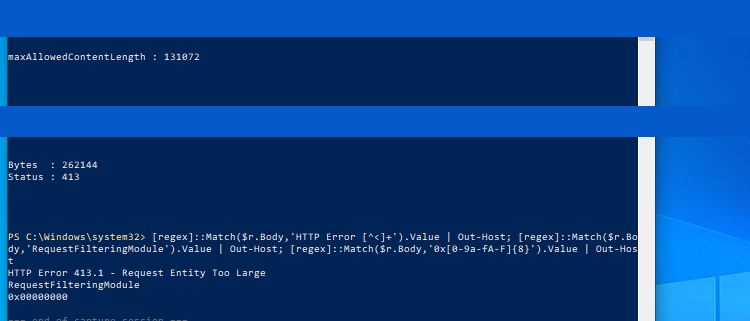
The Framework branch threw Maximum request length exceeded while reading Request.InputStream. This handler caught it, selected HTTP 500, and set TrySkipIisCustomErrors. Do not generalize that all oversized Framework requests return 500; identify the original exception and read path.
Read both effective sections at the exact scope:
$ErrorActionPreference='Stop'
$AppCmd="$env:windir\System32\inetsrv\appcmd.exe"
$Scope='BusinessSite/Upload'
& $AppCmd list config $Scope /section:system.webServer/security/requestFiltering
if($LASTEXITCODE -ne 0){throw 'Cannot read IIS effective limit'}
& $AppCmd list config $Scope /section:system.web/httpRuntime
if($LASTEXITCODE -ne 0){throw 'Cannot read ASP.NET effective limit'}
This bounded example aligns both to a 512-KiB request with a lower disk-buffer threshold:
<configuration>
  <system.web>
    <httpRuntime maxRequestLength="512" requestLengthDiskThreshold="80" />
  </system.web>
  <system.webServer>
    <security>
      <requestFiltering>
        <requestLimits maxAllowedContentLength="524288" />
      </requestFiltering>
    </security>
  </system.webServer>
</configuration>
Merge these elements while preserving other attributes. requestLengthDiskThreshold must not exceed maxRequestLength, or configuration itself becomes invalid. See Framework MaxRequestLength.
The limit concerns request size, including multipart boundaries and other fields. Budget overhead above the allowed attachment size instead of selecting enormous limits. Do not raise executionTimeout without timeout evidence. Reverse proxies/other application layers can impose additional limits; this control isolated only IIS and System.Web.
The repaired 262144-byte payload returned:
31a1f9dea0169551092d05e8bf4a446228c8c3eb4c9b713c66adcb7fd53c89beThe client hash matched. The small payload still worked, an independent 786432-byte body remained rejected with 413.1, and health returned HEALTH-OK. Validate persistent objects too in a real upload system rather than relying only on the handler's response.
4. Inheritance error 500.19
Three directories served the same CONTENT-OK index.txt. One child declared parent-locked staticContent and failed with 0x80070021. Another re-added inherited .kbtype and failed with 0x800700b7. Its neighbor stayed healthy.
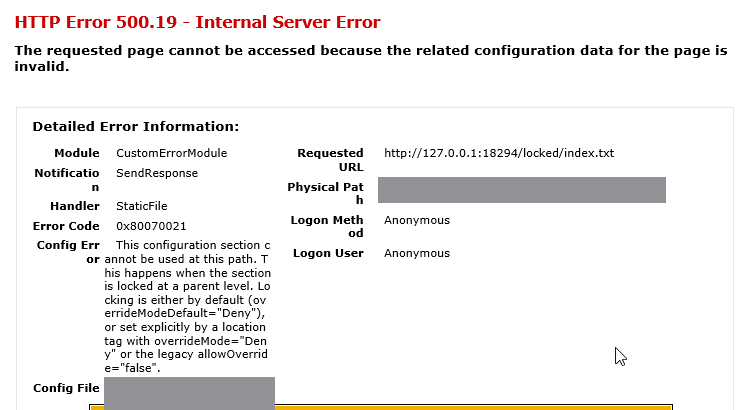
For locking, follow Config File, Config Source, and line numbers upward to overrideModeDefault or scoped location declarations. Even if the response names CustomErrorModule/SendResponse, Config Error provides the configuration cause.
If the parent owns the setting and the child needs no override, remove only the child's redundant section. If delegation is required, authorize the exact application scope rather than changing server-wide locking defaults.
For duplicates, mimeMap is keyed by fileExtension, not MIME value. Re-adding an inherited .kbtype conflicts. Remove the child entry to inherit it unchanged, or remove/re-add that exact key for a required local override:
<configuration>
  <system.webServer>
    <staticContent>
      <remove fileExtension=".kbtype" />
      <mimeMap fileExtension=".kbtype" mimeType="application/octet-stream" />
    </staticContent>
  </system.webServer>
</configuration>
Do not clear the entire inherited collection for one conflict. Investigate read rights for 0x80070005 and XML/unrecognized sections/missing components for 0x8007000d. A global unlock is not a common solution to all of them. See 500.19 by HRESULT.
The original failed paths recovered to 200/CONTENT-OK while siblings remained healthy. Read effective MIME mappings and test other static resources too; a healthy homepage does not validate the failed child URL.
5. Validation and rollback
Back up web.config outside the site, retain effective configuration/request samples, and avoid concurrent publishing. Change only the diagnosed elements. Repeat the same identity, URL, and input, plus adjacent functions and explicit negative controls.
These scoped changes generally do not require iisreset. A web.config change can itself restart the ASP.NET AppDomain, affecting InProc Session/cache, so include that in release planning. For rollback, compare intervening changes and restore only the relevant elements; do not replace another operator's deployment with an entire stale file.