
AD Password and Group Access Changes
A password or group membership can change in AD while a user's share access stays unchanged. First establish whether the test concerns fresh authentication, a current process token, or an established SMB session. Refreshing one does not demonstrate that the others changed.
Two controls on Windows Server 2022 with Windows PowerShell 5.1 compare resetting u01's password and granting kb13g1 a group membership. The domain is corp.test.checo.cc, with LAB-DC1 and client LAB-MEMBER. Inspect directory, client, and file-server state separately.
1. States and inspection
| State | Evidence | Question answered |
|---|---|---|
| Directory | Query the account/group against a fixed DC | What does this DC currently store? |
| Client process token | whoami /groups inside the affected session | Which group SIDs does this process hold? |
| Kerberos cache | klist for that logon session | Which tickets are cached, with what timestamps? |
| Server connections | Get-SmbSession and Get-SmbOpenFile on the file server | Which authenticated contexts and handles remain? |
| Resource permissions | Share permissions and NTFS DACL | Who is authorized for this exact operation? |
An access token carries user/group SIDs and privileges. Changing directory membership does not rewrite an existing process token. See access tokens.
A client interactive token is also distinct from the file server's network-logon context. Fresh network authentication can obtain updated group information while the desktop token remains unchanged. A missing SID in local whoami is useful evidence, but does not by itself prove that every remote access requires a complete workstation logoff.
2. Sessions after password reset
The October record first established \\LAB-DC1\KB01 as ADLAB\u01 and wrote a file. The administrator then reset its password:
=== write 2 (before reset) ===
write2=OK
=== reset on LAB-DC1 19:00:53 ===
logon_old_pwd_rc=1326
logon_new_pwd_rc=0
=== write 3 via EXISTING session 19:01:07 ===
write3=OK
Fresh old-password authentication returned 1326; the new password returned zero. The existing connection still accepted writes. These are separate acceptance tests.
The logon ID was 0:0x1bed571, with a TGT and cifs/LAB-DC1 ticket. Recorded End Time was October 30 at 05:00:30, and the TGT Renew Time was November 5 at 19:00:30. These timestamps reflect this issuance/policy, not universal lifetimes or an SMB forced-disconnect deadline.
Purging the cache did not stop writes through the established connection:
--- klist after purge ---
Cached Tickets: (0)
--- write 4 via EXISTING session after purge ---
write4=OK
Closing its SMB session on the server caused the next write through the old mapping to fail; net use showed Disconnected. The supported conclusion is narrow: this existing SMB session did not require the client to retain that cached ticket. It does not prove that password changes have no effect on every new Kerberos request, account restriction check, or other service.
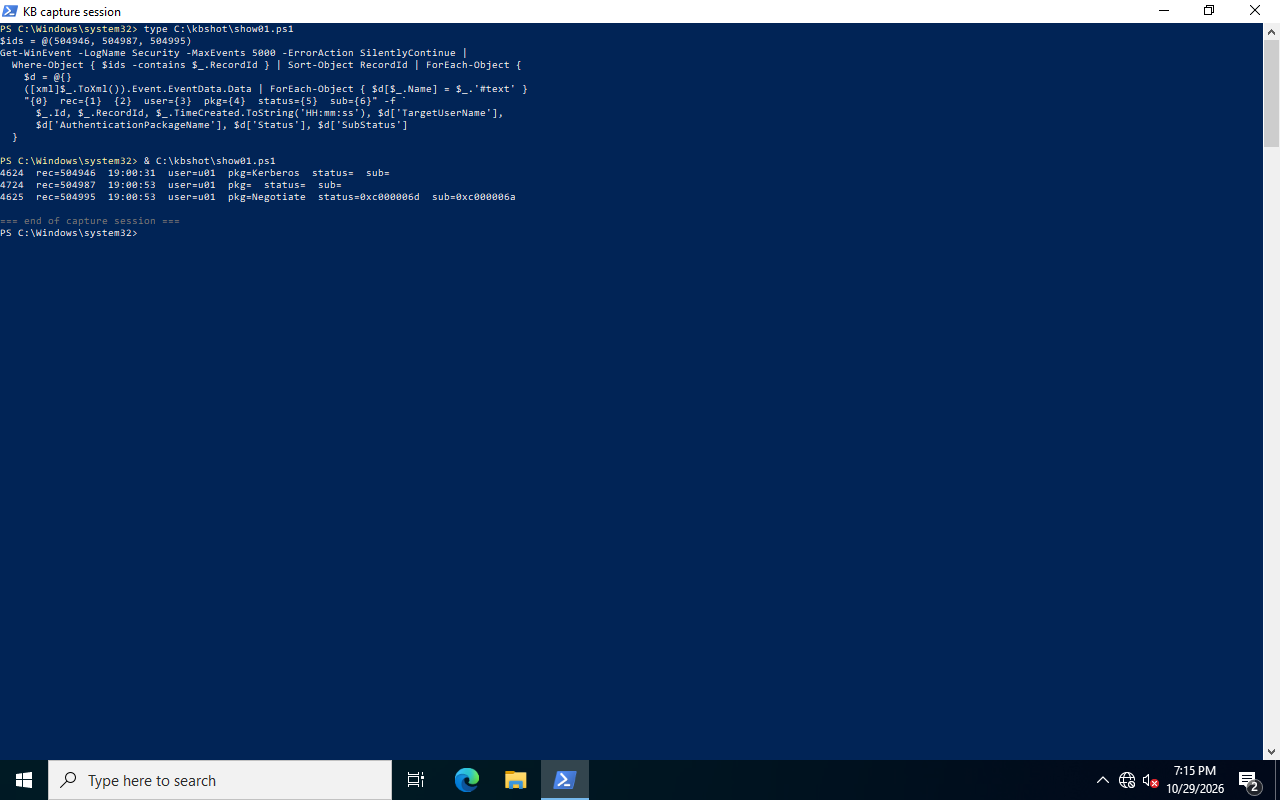
Event 4624, record 504946, recorded Kerberos as AuthenticationPackageName. Preserve the actual field when identifying the protocol. A hostname or IP address alone is insufficient; Kerberos with IP addresses also depends on SPNs and client configuration.
3. Access after group changes
In November, kb13g1 logged on at the console without KB-T13-ScriptUsers membership. The administrator added it and read memberOf back from the DC. The existing user session still could not open Z:.
| Time | Action/state | Target group in current token | Share result |
|---|---|---|---|
| 12:34:09 | Before addition; 7 cached tickets | No | Access is denied |
| After addition | DC confirms membership | No | Still denied |
| 12:34:43 | Successful purge, 7 → 0 tickets | No | Still denied |
| 12:36:13 | Full console logoff/logon | Yes; SID suffix 4761 | readme.txt listed |
The record did not separately dismantle and recreate every relevant network context while retaining the same desktop. It therefore establishes that cache purging did not repair this existing access, not that purging can never help update remote group authorization.
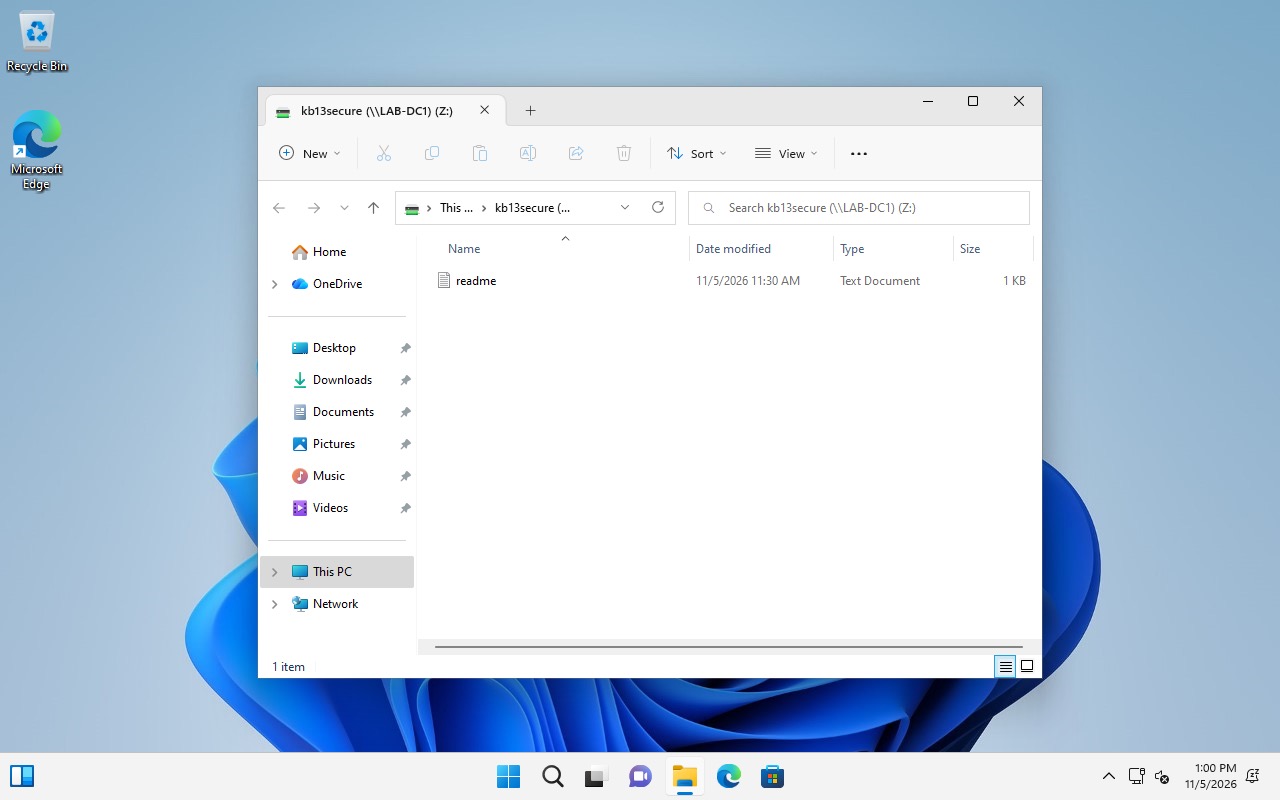
The new session had five tickets, compared with seven originally. Ticket count is not an acceptance criterion. Inspect the actual group SID, relevant service ticket, and operation. Disconnecting/reconnecting RDP into the same session is not logoff and does not automatically replace its desktop token.
4. Capture current state
Collect read-only evidence in the affected user session, on the AD management host, and on the file server:
# Run in the affected user's session, not an unrelated administrator shell.
whoami /user
whoami /groups
klist
Get-SmbConnection | Select-Object ServerName,ShareName,UserName,Dialect,NumOpens
# Run on a management host with the AD module; use a confirmed DC.
$dc = 'LAB-DC1.corp.test.checo.cc'
Get-ADUser kb13g1 -Server $dc -Properties memberOf |
Select-Object SamAccountName,SID,memberOf
Get-ADGroup 'KB-T13-ScriptUsers' -Server $dc -Properties member |
Select-Object Name,SID,membermemberOf describes direct membership; primary groups, group scope, nesting, and cross-domain conditions need separate consideration. Compare the exact group SID granted in the resource ACL. A gpresult group listing is not an independent live DC query. Likewise, whoami from an administrator's own shell says nothing about the affected user's token.
Inspect both share and file permissions on the server:
Get-SmbShareAccess -Name KB01
(Get-Acl -LiteralPath 'C:\KB01').Access |
    Select-Object IdentityReference,FileSystemRights,AccessControlType,IsInherited
The password experiment granted u01 the required writes at both layers and retained administrator/SYSTEM management rights. A negative control, u02, authenticated successfully with result zero but could neither read nor write. This separates authentication success from resource authorization. Use a dedicated test folder; do not reproduce the experiment by clearing an existing business directory's ACL.
5. Close SMB sessions
Prompt for a replacement password instead of embedding a usable secret:
$newPassword = Read-Host 'New account password' -AsSecureString
Set-ADAccountPassword -Identity u01 -Server 'LAB-DC1.corp.test.checo.cc' `
    -Reset -NewPassword $newPassword
Remove-Variable newPassword
If the objective includes stopping existing share access, handle that file server's connections separately. Review the user, client, and open files before choosing one SessionId:
# On the file server: inspect first, then select one confirmed session.
Get-SmbSession | Select-Object SessionId,ClientComputerName,ClientUserName,NumOpens
$sessionId = [uint64](Read-Host 'Confirmed SMB SessionId')
$s = Get-SmbSession -SessionId $sessionId -ErrorAction Stop
$s | Format-List SessionId,ClientComputerName,ClientUserName,NumOpens
Get-SmbOpenFile -SessionId $sessionId |
    Select-Object FileId,SessionId,Path,ClientUserName
# Closing can interrupt open files. Execute after reviewing the exact target.
Close-SmbSession -SessionId $sessionId -Confirm
Closing a session can interrupt unsaved file operations. Do not close every user's session solely because they share a client IP, or default to deleting every client mapping. For a targeted rebuild, inspect related connections/handles and use the exact path:
net use \\LAB-DC1\KB01 /delete
# Run in the target user's session only when clearing its cache is intended.
klist purge
The purge affects other Kerberos usage in that logon session; its scope exceeds one share. Error 1219 is a conflicting-credentials connection condition, distinct from a fresh old-password login failing with 1326. Removing one mapping may not remove all related server connections, so inspect before expanding scope. See klist command scope.
6. Access validation
After granting membership, confirm it on the chosen DC and retry in the security context the resource actually uses. If interactive client processes must acquire the SID, save work, fully log off/on, and check the exact SID. For a network-only rebuild, validate the fresh server logon and actual reads/writes without requiring the old desktop token to change.
For revocation, independently verify that fresh authentication with the old password fails, the selected old connection ends, and the target account cannot perform the revoked resource operation through a new connection. Other file servers/applications can retain their own sessions. Closing one SMB server's connection does not prove global revocation. Do not interpret a ticket-policy lifetime as an established-connection countdown.
The historical 4627 query returned no matching events. Group evidence cannot be added retrospectively. Microsoft's guidance requires Audit Group Membership and successful Audit Logon to be enabled beforehand; a large list can span several events. See 4627 prerequisites.
Clean up only dedicated shares/files/test memberships, retaining the original ACL and membership snapshots. A closed connection has no in-place rollback; restoring permission requires the client to establish a new connection.