
LDAP Queries for AD Objects and Groups
LDAP Success does not prove that a synchronization client received complete data. A search can omit objects, one returned object can omit attribute values, and a group query can answer direct membership instead of the eligibility question the application intended.
A complete query needs separate handling for object paging, multi-value ranges, transitive membership, and primary groups. The examples use Windows Server 2022, LAB-DC1.corp.test.checo.cc, and Windows PowerShell 5.1 to check each layer of a synchronization query.
1. Query completeness
| Layer | What can be missing | Inspect |
|---|---|---|
| Search result set | Objects beyond the server page limit | PageSize and request/response paging cookies |
| One multivalued attribute | Later member ranges | Returned range attribute and terminal wildcard |
| Group graph | Users nested through an inner group | Direct versus transitive query semantics |
| Primary group | Membership not represented in memberOf | primaryGroupID and the complete group SID |
An empty paging cookie does not finish an attribute range. Reading every member value does not recursively enumerate every nested user. These are different reasons why adding paging can still leave people missing.
2. Object paging
The unpaged schema query stopped at 1000 entries. DirectorySearcher.PageSize=0 let FindAll enumeration finish without an exception. An unpaged LdapConnection.SendRequest instead raised DirectoryOperationException with server resultCode 4, sizeLimitExceeded, while retaining entries in the exception’s Response.Entries.
Inspect Exception.Response.ResultCode and Response.Entries; an empty PartialResults collection does not mean the response contained no entries.
| Historical query path | Count | Recorded behavior |
|---|---|---|
| DirectorySearcher, unpaged | 1000 | No exception |
| LdapConnection, unpaged | 1000 partial entries | sizeLimitExceeded |
| DirectorySearcher, page size 500 | 1770 | Enumeration completed |
| Raw LDAP paging, page size 500 | 1769, four pages | No duplicates |
| Independent AD-module query | 1768 | A different set was recorded |
The complete-result counts were 1770, 1769, and 1768. One CN=Aggregate virtual entry cannot explain every difference. Align SearchBase, scope, root inclusion, and virtual-entry handling, then compare DN sets. Counts alone do not establish equivalent result sets.
What is established is that the unpaged path stopped at 1000 and paging continued beyond it. No exception was insufficient acceptance evidence. A follow-up comparison must fix DC, Base, Scope, Filter, requested attributes, and identity, and record the actual DN-set differences rather than counts alone.
Follow cookies and collect identities rather than display names
This read-only example fixes OneLevel scope, uses Negotiate signing/sealing, fails if the response paging control is missing, and disposes the connection. DN is collected instead of potentially empty/nonunique lDAPDisplayName:
Add-Type -AssemblyName System.DirectoryServices.Protocols
$dc = 'LAB-DC1.corp.test.checo.cc'
$ldap = New-Object System.DirectoryServices.Protocols.LdapConnection($dc)
$ldap.AuthType = [System.DirectoryServices.Protocols.AuthType]::Negotiate
$ldap.SessionOptions.Signing = $true
$ldap.SessionOptions.Sealing = $true
$ldap.Timeout = [TimeSpan]::FromSeconds(30)
try {
    $ldap.Bind()
    $rootRequest = New-Object System.DirectoryServices.Protocols.SearchRequest(
        '', '(objectClass=*)',
        [System.DirectoryServices.Protocols.SearchScope]::Base,
        [string[]]@('schemaNamingContext'))
    $rootResponse = $ldap.SendRequest($rootRequest)
    $base = [string]$rootResponse.Entries[0].Attributes['schemaNamingContext'][0]
    $request = New-Object System.DirectoryServices.Protocols.SearchRequest(
        $base, '(objectClass=*)',
        [System.DirectoryServices.Protocols.SearchScope]::OneLevel,
        [string[]]@('distinguishedName'))
    $page = New-Object System.DirectoryServices.Protocols.PageResultRequestControl(500)
    $page.IsCritical = $true
    [void]$request.Controls.Add($page)
    $dns = New-Object 'System.Collections.Generic.HashSet[string]' ([StringComparer]::OrdinalIgnoreCase)
    $pages = 0
    $duplicates = 0
    do {
        $response = $ldap.SendRequest($request)
        $pages++
        foreach ($entry in $response.Entries) {
            if (-not $dns.Add($entry.DistinguishedName)) { $duplicates++ }
        }
        $reply = @($response.Controls | Where-Object {
            $_ -is [System.DirectoryServices.Protocols.PageResultResponseControl]
        })
        if ($reply.Count -ne 1) { throw 'Expected one paging response control' }
        $page.Cookie = $reply[0].Cookie
    } while ($page.Cookie.Length -ne 0)
    [pscustomobject]@{ Objects=$dns.Count; Pages=$pages; Duplicates=$duplicates }
} finally {
    $ldap.Dispose()
}
Page size 500 is a client request, not a reason to increase the DC’s MaxPageSize. A control error, evicted cookie, or timeout makes the entire round incomplete. Restart and reconcile rather than applying a partial snapshot. Keep connection, Base, Filter, and Scope unchanged throughout continuation.
3. Large-group ranges
The range lab created 1500 disabled test users and then added a 1501st. The target DC’s effective MaxValRange was 1500 and MaxPageSize was 1000, checked through policy readback and ntdsutil. All group requests returned ResultCode 0 and Entries 1.
| Actual members | Request | Returned attributes |
|---|---|---|
| 1500 | member | member: 1500 |
| 1501 | member | member: 0; member;range=0-1499: 1500 |
| 1501 | member plus object paging | Same values; paging cookie already empty |
| 1501 | member;range=0-* | member;range=0-1499: 1500 |
| 1501 | member;range=1500-* | member;range=1500-*: 1 |
Reading only Attributes['member'] can misidentify an empty group. Finding the first range without continuing loses the last member. Paging is genuinely complete because the search returned one object; the unfinished collection is inside that object. See Microsoft range retrieval.
Indices are zero-based and inclusive. After 0-1499, continue at 1500. A request wildcard still obeys server limits; only the wildcard in the returned attribute name establishes the final range.
This reviewed example targets an existing, readable, known-nonempty group. It accepts ordinary member or range responses, checks start/count/duplicates/termination, and bounds requests. It does not claim to distinguish empty groups from unreadable attributes in every directory:
Add-Type -AssemblyName System.DirectoryServices.Protocols
$dc = 'LAB-DC1.corp.test.checo.cc'
$groupDN = Read-Host 'DN of an existing, readable, nonempty group'
$ldap = New-Object System.DirectoryServices.Protocols.LdapConnection($dc)
$ldap.AuthType = [System.DirectoryServices.Protocols.AuthType]::Negotiate
$ldap.SessionOptions.Signing = $true
$ldap.SessionOptions.Sealing = $true
$ldap.Timeout = [TimeSpan]::FromSeconds(15)
$members = New-Object 'System.Collections.Generic.HashSet[string]' ([StringComparer]::OrdinalIgnoreCase)
$chunks = New-Object System.Collections.Generic.List[object]
$low = 0
$done = $false
try {
    $ldap.Bind()
    for ($iteration=0; $iteration -lt 10000; $iteration++) {
        $attribute = 'member;range={0}-*' -f $low
        $request = New-Object System.DirectoryServices.Protocols.SearchRequest(
            $groupDN, '(objectClass=group)',
            [System.DirectoryServices.Protocols.SearchScope]::Base,
            [string[]]@($attribute))
        $response = $ldap.SendRequest($request)
        if ($response.Entries.Count -ne 1) { throw 'Expected one group' }
        $entry = $response.Entries[0]
        $names = @($entry.Attributes.AttributeNames | Where-Object {
            $_ -match '^member(;range=\d+-(\d+|\*))?$' -and
            $entry.Attributes[$_].Count -gt 0
        })
        if ($names.Count -ne 1) { throw 'No unique member range; check empty group, rights, or response' }
        $name = [string]$names[0]
        $values = @($entry.Attributes[$name].GetValues([string]))
        foreach ($dn in $values) {
            if (-not $members.Add($dn)) { throw 'Repeated member; check concurrent changes' }
        }
        $chunks.Add([pscustomobject]@{ Requested=$attribute; Returned=$name; Count=$values.Count })
        if ($name -ieq 'member') {
            if ($low -ne 0) { throw 'Unexpected plain attribute during continuation' }
            $done=$true; break
        }
        $m = [regex]::Match($name, '^member;range=(\d+)-(\d+|\*)$', 'IgnoreCase')
        if (-not $m.Success -or [int]$m.Groups[1].Value -ne $low) { throw 'Invalid range start' }
        if ($m.Groups[2].Value -eq '*') { $done=$true; break }
        $high = [int]$m.Groups[2].Value
        if ($high -lt $low -or $values.Count -ne $high-$low+1) { throw 'Nonprogress range' }
        $low = $high+1
    }
    if (-not $done) { throw 'Terminal range not received' }
    $chunks | Format-Table
    'Unique members: {0}' -f $members.Count
} finally {
    $ldap.Dispose()
}
The historical run obtained 1501 unique DNs and compared them with the creation record. That result is not a fresh execution of this expanded sample.
Pinning one DC reduces replication differences, but range retrieval is not a transaction snapshot of a changing group. Duplicate detection catches some changes, not all omissions. A synchronization design must track relevant changes, repeat a full round, or use a mechanism appropriate to its consistency requirements. A duplicate-free pass does not prove the directory stayed unchanged.
4. Nested membership
The nested-group control first put the user directly in the outer group: both filters matched one user. Changing only the membership graph to user → inner group → outer group made direct memberOf equality return zero while in-chain still returned one. An unrelated user never matched; restoring the direct link made the original filter match again.
OID 1.2.840.113556.1.4.1941 follows DN links transitively. It does not automatically add primary-group or every resource-authorization mechanism. Preserve person type, exact identity, and business scope when replacing a direct equality condition.
This example escapes filter values; escaping a filter value and constructing a DN are different tasks:
function Escape-LdapFilterValue([string]$value) {
    $value.Replace('\','\5c').Replace('*','\2a').Replace('(','\28').Replace(')','\29').Replace([string][char]0,'\00')
}
$userSam = Escape-LdapFilterValue 'a03in-ca31058c'
$outerDN = Escape-LdapFilterValue (Read-Host 'Target outer group DN')
$filter = '(&(objectCategory=person)(objectClass=user)(sAMAccountName={0})(memberOf:1.2.840.113556.1.4.1941:={1}))' -f $userSam,$outerDN
Get-ADUser -LDAPFilter $filter -Server 'LAB-DC1.corp.test.checo.cc'
The record used an explicit [string[]] for PropertiesToLoad.AddRange to match its .NET parameter. That does not establish a universal rule that omitting the cast makes the server return no attributes. Check the actual requested attributes and CLR overload binding when counts match but values are absent.
Cross-domain/GC link visibility, group scope, and security-principal expansion require separate treatment. A single-domain lab does not establish forest-wide eligibility. Never concatenate unescaped identity values, or replace unique-identity checks with taking the first match.
5. Primary groups
In the primary-group experiment, u01 had KBGrpPrim as its primary group, primaryGroupID 4714. memberOf showed Domain Users but not KBGrpPrim. A fresh logon token contained KBGrpPrim’s SID and could read a directory granted to that group; unrelated u02 was denied.
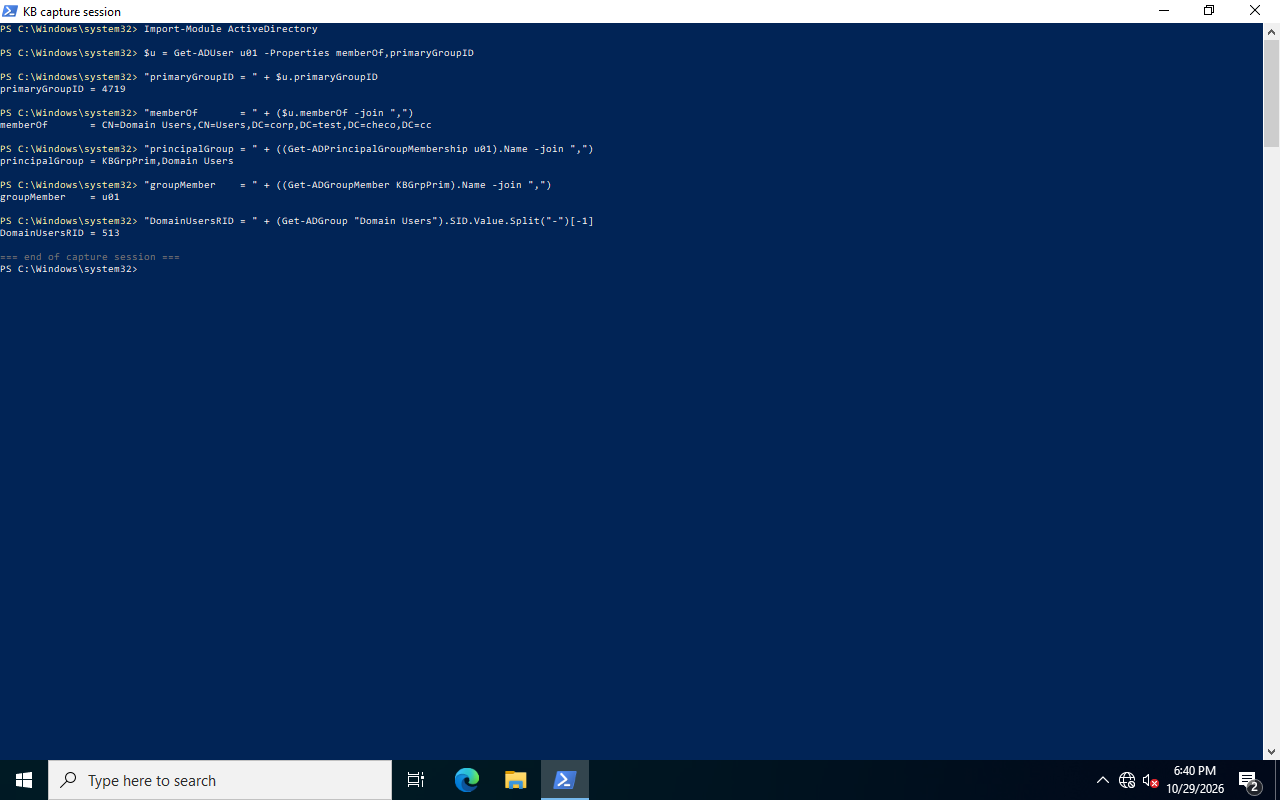
primaryGroupID stores a RID, not a name or DN. Construct the complete SID from the user’s account-domain SID before comparing it with the target group. Matching only trailing RIDs can confuse two domains. See primaryGroupID.
Import-Module ActiveDirectory
$dc = 'LAB-DC1.corp.test.checo.cc'
$u = Get-ADUser u01 -Server $dc -Properties memberOf,primaryGroupID
$g = Get-ADGroup KBGrpPrim -Server $dc
$primarySid = '{0}-{1}' -f $u.SID.AccountDomainSid.Value,$u.primaryGroupID
[pscustomobject]@{
    DirectMember = @($u.memberOf) -contains $g.DistinguishedName
    PrimaryGroup = $primarySid -eq $g.SID.Value
    UserPrimaryGroupSid = $primarySid
    TargetGroupSid = $g.SID.Value
}
This checks direct membership and primary group separately, not all nesting, cross-domain behavior, or final file authorization. tokenGroups can provide a group-SID view under its requirements. Resource access still depends on the actual token, share/NTFS ACLs, and the access operation.
The record also showed Get-ADGroupMember returning u01. That does not prove that the raw member attribute retained an ordinary primary-group link. Cmdlet enumeration and direct LDAP attributes are separate evidence layers; do not explain the former as nothing more than a raw attribute read.
Removing the current primary-group membership directly produced error 1374:
Remove-ADGroupMember : The user cannot be removed from a group because the group is currently the user's primary group
    + FullyQualifiedErrorId : ActiveDirectoryServer:1374
Before rollback, establish the original primaryGroupID and ordinary memberships. This lab restored Domain Users RID 513, but migration/POSIX scenarios may intentionally use something else. Do not reset every account to 513. Validate changed tokens through fresh logons; old processes keep their tokens. A whoami child launched during thread impersonation can show the host process token and is not proof that the impersonated thread lacks a group.
6. Synchronization checks
Record server, identity, naming context, scope, filter, requested attributes, pages, range responses, unique identities, and failure state. A failed paging/range pass must not authorize deletions that assume a complete snapshot.
The query samples are read-only; cleanup releases connections and restores diagnostic configuration. The original data-creation labs removed disposable users, groups, and OUs by recorded GUID. The primary-group lab first restored primary/ordinary membership state, then checked a new session and the original ACL. Increasing production LDAP limits does not repair a missing client loop.